<?xml version="1.0" encoding="utf-8"?><feed xmlns="http://www.w3.org/2005/Atom" ><generator uri="https://jekyllrb.com/" version="3.10.0">Jekyll</generator><link href="https://vikrantjain.github.io/feed.xml" rel="self" type="application/atom+xml" /><link href="https://vikrantjain.github.io/" rel="alternate" type="text/html" /><updated>2026-06-23T17:22:32+00:00</updated><id>https://vikrantjain.github.io/feed.xml</id><title type="html">The Architect’s Ledger</title><subtitle>Writing on software architecture, AI coding agents, and engineering practice.</subtitle><author><name>Vikrant Jain</name></author><entry><title type="html">I Ran Three Claude Code Agents as Three Teams — and They Shipped a Real Feature</title><link href="https://vikrantjain.github.io/three-claude-code-instances-one-feature/" rel="alternate" type="text/html" title="I Ran Three Claude Code Agents as Three Teams — and They Shipped a Real Feature" /><published>2026-06-18T00:00:00+00:00</published><updated>2026-06-18T00:00:00+00:00</updated><id>https://vikrantjain.github.io/three-claude-code-instances-one-feature</id><content type="html" xml:base="https://vikrantjain.github.io/three-claude-code-instances-one-feature/"><![CDATA[<p>A feature I was building touched three services at once: a payment backend, a sales-order backend, and a web frontend. The normal way to build that is three teams, three backlogs, a contract meeting that gets scheduled for next Tuesday, and an integration phase two weeks later where the parts that were supposed to fit don’t.</p>

<p>I built it in about eight hours instead — with three Claude Code agents, one per service, coordinating with each other in real time while a single human (me) held the brakes.</p>

<p>This is a build log of how that worked: the workflow that kept three parallel codebases coherent, the guardrails that kept three autonomous agents from stepping on each other, and, just as useful to the next person, where the friction showed up and why it stayed cheap to fix.</p>

<p>It’s also a sequel. A while back I <a href="/distributed-claude-code-agents-across-machines/">built a way for Claude Code instances to talk to each other across machines</a> — a proof-of-concept MCP-channel bridge I called <code class="language-plaintext highlighter-rouge">claude-code-chat</code>. That article ended on a toy demo: three agents building a counter app. Since then I’ve turned the prototype into a proper, installable Claude Code plugin, <a href="https://github.com/vikrantjain/claude-chat"><strong><code class="language-plaintext highlighter-rouge">claude-chat</code></strong></a> — early still, but a real, reusable plugin rather than a one-off script. The honest open question the demo left was whether the pattern survives contact with real, production-shaped work. This is the answer — run on the plugin, not the prototype.</p>

<blockquote>
  <p><strong>Scope note:</strong> this is a methodology record, not a feature design — a general way of working I now reach for, shown here on one real project. The feature happened to be optional 3D Secure (3DS — the “verify it’s really the cardholder” step on card payments), but the feature and its details belong to the project; what’s reusable, and all this article is really about, is <em>how three agents built it together</em>.</p>
</blockquote>

<hr />

<h3 id="from-agents-can-talk-to-agents-ship-together">From “agents can talk” to “agents ship together”</h3>

<p>The first article built the plumbing; since then it’s become an installable plugin. <code class="language-plaintext highlighter-rouge">claude-chat</code> is an MCP channel server you add to a project: each Claude Code instance runs it alongside itself, connects to a shared WebSocket broker (the relay every instance meets on), and gets two tools — <code class="language-plaintext highlighter-rouge">send_message</code> (broadcast or directed) and <code class="language-plaintext highlighter-rouge">list_participants</code>. Inbound messages don’t wait for a tool call: the server uses Claude Code’s experimental <a href="https://code.claude.com/docs/en/channels">Channels API</a> to inject them <em>inline</em> in the conversation, so an agent just <em>sees</em> a peer’s message the way it sees anything else. No polling, no inbox.</p>

<p>Why not just use sub-agents or agent teams? Both are real Claude Code features — and both run under a single coordinating session: sub-agents are workers one session spawns and that report back to it; agent teams let separate sessions work as peers, but a single lead session owns the shared task list they coordinate through. The distributed model is different in kind — independent peer sessions that meet on a channel — which is what lets the work span the separate machines, and people, your services actually live on. It also keeps each session lean: each instance carries only its own repo’s context, not all three codebases at once.</p>

<p>That original demo proved the messages flow. It didn’t prove the <em>coordination</em> — whether agents given a real, interdependent feature would actually divide the work, agree on an interface, and integrate without a human stitching every seam by hand.</p>

<p>So I set up the real test. Three services that genuinely depend on each other, one shared contract between them, an external payment gateway in the loop, and a feature that had to work end-to-end against a live sandbox. Three agents, three repos, one human. Go.</p>

<hr />

<h3 id="the-setup-three-services-three-agents-one-human">The setup: three services, three agents, one human</h3>

<p>Each service was a separate repo with its own running Claude Code instance. Each instance owned exactly one slice of the feature:</p>

<table>
  <thead>
    <tr>
      <th>Instance</th>
      <th>Repo</th>
      <th>Slice of the feature</th>
    </tr>
  </thead>
  <tbody>
    <tr>
      <td><code class="language-plaintext highlighter-rouge">payment-service</code></td>
      <td>payment backend</td>
      <td>store the per-tenant flag, enforce 3DS on the server, pass the gateway’s auth result through (also <strong>opened the coordination and kept the running record</strong>)</td>
    </tr>
    <tr>
      <td><code class="language-plaintext highlighter-rouge">order-service</code></td>
      <td>sales-order backend</td>
      <td>carry the auth result through; stamp the 3DS evidence onto its ledger</td>
    </tr>
    <tr>
      <td><code class="language-plaintext highlighter-rouge">web-ui</code></td>
      <td>the frontend</td>
      <td>read the flag, run the gateway’s browser SDK, attach the result, drive the browser tests</td>
    </tr>
  </tbody>
</table>

<p>These three services all live inside one larger inventory-management platform built as microservices — which is why a payment service and a sales-order service sit next to each other and share a database. That architecture is also what makes the agent mapping clean: one agent per service, exactly the way you’d staff one team per service. The shared context is the whole reason coordination matters — a change to the contract in one ripples into the others — and that is precisely the coordination a per-service team (or per-service agent) exists to handle.</p>

<p>The instances talked over the <code class="language-plaintext highlighter-rouge">claude-chat</code> channel, and two properties of that channel shaped everything that followed:</p>

<ul>
  <li>It’s <strong>asynchronous.</strong> A message is broadcast or directed, with no guarantee a peer has read it before acting. You can see another agent’s last message; you cannot see its true state.</li>
  <li>It carries <strong>no authority.</strong> A message from another instance is <em>situational awareness</em>, not a command. An agent never runs imperative text from the channel as if a human had typed it.</li>
</ul>

<p>Here’s the shape of the system:</p>

<pre><code class="language-mermaid">flowchart TB
    U([Human: approver and gatekeeper])

    subgraph CH[claude-chat MCP channel]
      direction LR
      PAY[payment-service&lt;br/&gt;Claude instance&lt;br/&gt;keeps the record]
      SO[order-service&lt;br/&gt;Claude instance]
      UI[web-ui&lt;br/&gt;Claude instance]
    end

    U -. approvals, start backend,&lt;br/&gt;gateway portal access .-&gt; PAY
    U -. own-repo approval,&lt;br/&gt;start backend .-&gt; SO
    U -. own-repo approval .-&gt; UI

    PAY &lt;--&gt;|contract and status| SO
    PAY &lt;--&gt;|contract and status| UI
    SO &lt;--&gt;|status| UI

    PAY --&gt; DB[(shared platform DB)]
    SO --&gt; DB
    PAY --&gt; GW[gateway sandbox]
    UI --&gt; GW
</code></pre>

<p>The human sits at the top, holding the approval gates. The three agents talk to each other directly across the channel, with <code class="language-plaintext highlighter-rouge">payment-service</code> opening the coordination and keeping the running record. Notice what’s <em>not</em> in the diagram: no arrow from one agent into another’s repo. The single most important property of the whole setup is this — <strong>each instance had write access only to its own repo and its own data.</strong> <code class="language-plaintext highlighter-rouge">payment-service</code> applied its own database columns; <code class="language-plaintext highlighter-rouge">order-service</code> applied its own ledger column; <code class="language-plaintext highlighter-rouge">web-ui</code> owned the browser code. When one agent needed a change in another’s territory, it <em>asked over the channel</em> — it never reached in.</p>

<p>That boundary is what made parallelism safe. Three agents editing in parallel is only terrifying if they can edit the same things. Give each one a fenced yard and autonomy stops meaning risk.</p>

<hr />

<h3 id="the-workflow-contract-first-build-in-parallel-verify-live">The workflow: contract-first, build in parallel, verify live</h3>

<p>The session ran in a clear shape: agree on the interface before anyone writes feature code, build all three slices at once against that frozen interface, then start the real stack and test the whole chain live.</p>

<pre><code class="language-mermaid">flowchart TD
    A[Plan mode: research own repo&lt;br/&gt;learn peers over the channel + initial brief] --&gt; B{Human approves plan}
    B --&gt;|yes| C[Draft cross-service contract]
    B --&gt;|needs work| A
    C --&gt; D[Ratify with consumers over claude-chat&lt;br/&gt;consumers review, web-ui runs an API spike]
    D --&gt; E[[Freeze contract v1]]
    E --&gt; F1[payment-service builds its slice]
    E --&gt; F2[order-service builds its slice]
    E --&gt; F3[web-ui builds its slice]
    F1 --&gt; G{Human: start backend stack}
    F2 --&gt; G
    F3 --&gt; G
    G --&gt; H[Live end-to-end test matrix vs gateway sandbox]
    H --&gt; I{Defects?}
    I --&gt;|yes| J[Fix in the owning repo&lt;br/&gt;re-verify against authority]
    J --&gt; H
    I --&gt;|no| K[Commit per repo on human approval]
    K --&gt; L[Docs deferred until sign-off]
</code></pre>

<p>Walking the stages:</p>

<p><strong>Plan, gated.</strong> The coordinator planned without ever reading the other repos. My initial prompt sketched the neighboring services, and it learned the rest by <em>asking the other agents over the channel</em> — what each service did and what it was capable of. From that it surfaced the genuine design forks to me, and only moved once I approved. Nothing got built on a guess about how the other services worked — and nothing required reaching into another team’s code to find out. The understanding arrived over the channel, exactly as it would if the three agents sat on three different machines.</p>

<p><strong>Contract-first.</strong> Before a line of feature code, the coordinator drafted the cross-service contract — the shape of the data passing between services — and <em>circulated it for ratification</em> instead of declaring it.</p>

<p><strong>Freeze.</strong> Once the consuming services agreed and the one external unknown was resolved, the contract was pinned as v1 and broadcast as the single reference.</p>

<p><strong>Parallel build.</strong> Each instance implemented its slice against the frozen contract, independently and at the same time.</p>

<p><strong>Integrate and verify.</strong> I started the backend stack; live tests ran against the real gateway sandbox — not mocks.</p>

<p><strong>Fix loop.</strong> Defects were fixed in the owning repo and re-checked against an authoritative source, not against memory.</p>

<p><strong>Commit, then docs.</strong> On my go-ahead, each repo landed its slice — <code class="language-plaintext highlighter-rouge">web-ui</code> and <code class="language-plaintext highlighter-rouge">order-service</code> as standard feature-branch PRs, <code class="language-plaintext highlighter-rouge">payment-service</code> handled differently. The narrative docs came last, after the behavior was proven.</p>

<p>The freeze point is the hinge. Everything before it is sequential and careful; everything after it runs in parallel. Get the contract right and the parallel phase mostly takes care of itself.</p>

<hr />

<h3 id="the-contract-was-the-load-bearing-piece">The contract was the load-bearing piece</h3>

<p>The contract is the thing that let three codebases move at once without drifting apart. It held because of three habits.</p>

<p><strong>It was ratified, not decreed.</strong> The first draft was a proposal. The consuming services pushed back before agreeing, and the contract got two concrete improvements out of it: a naming collision was caught and renamed (an inner field was shadowing the object that contained it), and a consumer asked for a stable, machine-detectable error marker — a <code class="language-plaintext highlighter-rouge">3DS_REQUIRED:</code> prefix — so the frontend could react to that specific case instead of string-matching free-form error text. Both were folded in <em>before</em> the freeze. The interface got better precisely because it was negotiated rather than handed down.</p>

<p><strong>One source of truth, additive shape.</strong> The flag lived in exactly one place — authoritative in the enforcing service, surfaced to the browser by extending a call that already existed. The pass-through data was <em>optional everywhere</em>, so when it was absent the existing flow stayed byte-for-byte unchanged. The feature was strictly additive and backward-compatible — which is a large part of why three services could adopt it without breaking each other.</p>

<p><strong>One canonical freeze, broadcast to all.</strong> After ratification, the contract was pinned as v1 and broadcast with explicit ownership of each part. From that moment it did not shift under anyone mid-build.</p>

<p>Here is how that ratification actually played out across the channel:</p>

<pre><code class="language-mermaid">sequenceDiagram
    autonumber
    participant PAY as payment-service (coordinator)
    participant SO as order-service
    participant UI as web-ui
    PAY-&gt;&gt;SO: Draft contract (data shape, enforcement, echo-back)
    PAY-&gt;&gt;UI: Draft contract + kick off an API spike
    SO--&gt;&gt;PAY: Review feedback (objections to the contract)
    UI--&gt;&gt;PAY: Spike result: needs a machine-detectable error marker (3DS_REQUIRED)
    PAY-&gt;&gt;PAY: Fold feedback (rename collision,&lt;br/&gt;add 3DS_REQUIRED marker) into the contract
    PAY--&gt;&gt;SO: Broadcast FROZEN v1 (with ownership)
    PAY--&gt;&gt;UI: Broadcast FROZEN v1 (with ownership)
    Note over PAY,UI: Parallel build begins against v1&lt;br/&gt;contract does not shift under anyone
</code></pre>

<p>The coordinator drafts and sends to both consumers, kicking the frontend off on a parallel spike to de-risk the one external unknown. The consumers send feedback back up. The coordinator folds it in — <em>once</em> — and broadcasts the frozen version with ownership attached. Only then does parallel build begin. The negotiation is front-loaded so the build phase has nothing left to argue about.</p>

<hr />

<h3 id="the-steering-wheel-kept-moving">The steering wheel kept moving</h3>

<p>The surprise wasn’t that the agents coordinated — it was that none of them stayed in charge, <code class="language-plaintext highlighter-rouge">payment-service</code> included. It had opened the session and kept the record — coordinator in the clerical sense — but bookkeeping isn’t authority. Leadership followed the work: whoever owned the flow in play took the wheel, steered it, and handed it on — and the agents worked those handoffs out among themselves, announcing each one over the channel rather than asking permission.</p>

<ul>
  <li><strong>Build — <code class="language-plaintext highlighter-rouge">payment-service</code> drove.</strong> It opened the coordination, worked the 3DS server logic through with <code class="language-plaintext highlighter-rouge">order-service</code>, then turned to <code class="language-plaintext highlighter-rouge">web-ui</code> to help build the browser changes against the frozen contract.</li>
  <li><strong>End-to-end UI testing — <code class="language-plaintext highlighter-rouge">web-ui</code> drove.</strong> Once the slices were ready, <code class="language-plaintext highlighter-rouge">web-ui</code> took the wheel and steered the live test runs. <code class="language-plaintext highlighter-rouge">payment-service</code> and <code class="language-plaintext highlighter-rouge">order-service</code> dropped into support — watching their own logs and fixing their own bugs as the tests flushed them out, while <code class="language-plaintext highlighter-rouge">web-ui</code> fixed its own.</li>
  <li><strong>Negative testing — <code class="language-plaintext highlighter-rouge">order-service</code> drove.</strong> Then <code class="language-plaintext highlighter-rouge">order-service</code> took control and deliberately broke things: forcing failures inside its own service to see how the whole chain handled them. The others watched how the end-to-end flow degraded and patched what surfaced.</li>
</ul>

<p>Two things held it together. <code class="language-plaintext highlighter-rouge">payment-service</code>, because it had started the session, kept the running record — each driver reported progress back to it, so there was one continuous account of what happened. And the handoffs were genuinely self-organized: the agents agreed among themselves who should own and steer each flow and posted the change to the channel, so I saw every handoff as it happened. I wasn’t approving who held the wheel — I was watching it move. My approval gates sat elsewhere, on the things you can’t cleanly undo: the plan, the commits, the external gateway. Nothing reassigned itself silently; every change was announced — just not gated.</p>

<p>That’s what “peer-to-peer” actually looked like — not three workers under one manager, but three peers passing a single steering wheel by agreement among themselves, with a human watching it move, not directing it.</p>

<pre><code class="language-mermaid">sequenceDiagram
    autonumber
    participant HU as human (kept informed)
    participant PAY as payment-service
    participant SO as order-service
    participant UI as web-ui
    Note over PAY,UI: payment-service keeps the running record throughout

    rect rgb(240,244,253)
    Note over PAY,UI: Phase 1 — build · payment-service steers
    PAY-&gt;&gt;SO: build 3DS server logic together
    PAY-&gt;&gt;UI: help build the browser changes
    end

    UI-&gt;&gt;PAY: agree — web-ui takes the wheel for UI tests
    PAY--&gt;&gt;HU: announce steering handoff (informational)
    rect rgb(240,250,244)
    Note over UI: Phase 2 — end-to-end UI tests · web-ui steers
    UI-&gt;&gt;UI: run live tests, fix own bugs
    PAY-&gt;&gt;PAY: watch logs, fix own bugs
    SO-&gt;&gt;SO: watch logs, fix own bugs
    UI--&gt;&gt;PAY: report progress
    end

    SO-&gt;&gt;PAY: agree — order-service takes the wheel for negative tests
    PAY--&gt;&gt;HU: announce steering handoff (informational)
    rect rgb(253,247,238)
    Note over SO: Phase 3 — negative testing · order-service steers
    SO-&gt;&gt;SO: force failures, test the chain
    PAY-&gt;&gt;PAY: observe end-to-end handling, fix
    UI-&gt;&gt;UI: observe end-to-end handling, fix
    SO--&gt;&gt;PAY: report progress
    end
</code></pre>

<p>The wheel changed hands twice; I assigned it zero times.</p>

<p><em>(It all runs on one open-source plugin, <a href="https://github.com/vikrantjain/claude-chat"><code class="language-plaintext highlighter-rouge">claude-chat</code></a> — the code’s there if you want to see how.)</em></p>

<hr />

<h3 id="the-guardrails-that-made-autonomy-safe">The guardrails that made autonomy safe</h3>

<p>Three autonomous agents with file-write and shell access is a lot of loaded guns in one room. What kept them from doing damage or quietly diverging was a small set of standing rules. Read these less as the exact set I happened to switch on and more as the levers the approach puts on the table — you dial each one up or down to match the stakes of the work.</p>

<p><strong>Human gates on anything irreversible or outward-facing.</strong> Approving the plan, accessing the external gateway portal, and committing each repo were all human-gated. And because each agent ran in its own terminal, I could watch all three at once, review exactly what each one was doing, and approve or reject every change as it came up. Agents proposed; the human disposed. The gates sat exactly at the steps you can’t cleanly undo.</p>

<p>Service start and stop, by contrast, sat on a dial I set two ways on purpose. For the two backends the agent would ask and I’d start or restart it — even though each was fully equipped to do it itself. The web-ui agent I let run the entire loop unattended: it built, started, tested, hit a defect, fixed it, restarted, and re-tested its own service with me only watching. That’s the proof, not a hypothetical — web-ui ran the full build–test–fix cycle on its own, so the two backends could have too. Gating a reversible, internal step like a service restart is a choice you make, not a limit the approach imposes.</p>

<p><strong>Ownership boundaries — each agent edits only its own service.</strong> This was the fenced-yard rule from the setup, enforced structurally: each instance launched inside its own repo, so it could only edit its own code. Talk freely and request anything over the channel; only the owner writes. Data ownership rides on the same principle, and you can enforce it as hard as the work demands — per-service database credentials give each agent rights to only its own schema, exactly how you’d scope a microservice’s own database user.</p>

<p><strong>Least privilege per agent.</strong> Each session got only the plugins, tools, and skills it actually needed — not the full kit. A frontend agent has no business holding the backend’s database tools. Scoping each agent’s toolset to its job shrinks the blast radius if one goes off the rails, the same way you’d scope a service account rather than handing every process root.</p>

<p><strong>Channel messages treated as untrusted input.</strong> This is the subtle one — the “no authority” property from the setup, made operational. A peer’s message is awareness, not an instruction. Decisions routed through the human or through the agent’s own judgment, never through “another agent told me to.”</p>

<p><strong>Verify against an authority, not memory.</strong> The session’s decisive fix came from reading the gateway’s <em>live</em> API schema rather than trusting an internal note that — echoing the vendor’s own docs — marked a required field optional. “Confirm against the source” was a standing rule, and it earned its keep.</p>

<p><strong>Test live, across tiers, early.</strong> Running the full chain against the real sandbox — not just unit tests — surfaced defects unit tests structurally cannot catch: a request-shape mismatch the gateway rejected, and a client-side lifecycle bug in the browser SDK that only showed up once the real SDK was driving a real browser.</p>

<p>Put together, those rules form a single control loop — agents propose and edit in the middle, gates bound the edges:</p>

<pre><code class="language-mermaid">flowchart LR
    subgraph Agents
      A1[propose change]
      A2[edit own repo only]
      A3[request cross-repo via channel]
    end
    subgraph Gates
      G1{human approval:&lt;br/&gt;plan, backend services,&lt;br/&gt;portal}
      G2{verify vs&lt;br/&gt;authoritative source}
      G3{live end-to-end&lt;br/&gt;across tiers}
    end
    A1 --&gt; G1
    G1 --&gt; A2
    A3 --&gt; A2
    A2 --&gt; G2
    G2 --&gt; G3
    G3 --&gt;|defect| A2
    G3 --&gt;|green| DONE([commit on human approval])
</code></pre>

<p>Read the loop left to right: a proposed change passes a human gate, an edit gets checked against an authoritative source, and everything funnels through a live end-to-end test. A defect bounces straight back to the owning repo; only green code reaches the commit gate. The agents own the mechanical work in the middle; the human owns the edges.</p>

<hr />

<h3 id="why-it-was-fast">Why it was fast</h3>

<p>The headline from the session was wall-clock time. As three human teams — payments backend, orders backend, frontend — this feature is a multi-day-to-multi-week cycle, and most of that time isn’t coding. It’s <em>coordination latency</em>: scheduling the contract discussion, waiting in each team’s queue, the late integration phase once everyone’s “done,” and the back-and-forth when integration surfaces a mismatch.</p>

<p>Here that calendar collapsed into a single working session. The compression came from removing coordination cost, not from typing faster:</p>

<ul>
  <li><strong>Zero scheduling latency.</strong> The three “teams” were online at once and answered each other within the same minute. No calendars, no standups, no timezones, no waiting for another team to get to it. The only thing anyone waited on was a human approval gate.</li>
  <li><strong>Instant ramp, no context-switching.</strong> Each agent already held its repo’s full context. No onboarding, no “let me page this back in,” no penalty for three slices progressing at once.</li>
  <li><strong>Contract-first removed the integration phase.</strong> Because the interface was frozen before parallel work began, integration wasn’t a late, risky event — the slices fit when they met. The classic “each part works alone but not together” week largely didn’t happen.</li>
  <li><strong>Minutes-long feedback loops.</strong> When live testing surfaced a defect, it was diagnosed, fixed in the owning repo, rebuilt, and re-tested in the same session — not filed, triaged, and scheduled across teams.</li>
</ul>

<p>One number to anchor this — and an honest breakdown of it. End to end, the session took <strong>about eight hours</strong> of wall-clock time. But the agents were only actively working for maybe <strong>two</strong> of those hours. The other six were mine, and they split in two. Part was first-run cost I won’t pay again: standing up the environment, wiring the per-agent access controls, testing the setup held together, and learning to drive three agents at once. The rest won’t go away — researching the problem, the high-level design, planning the approach, and the context and expectations I set for the agents up front. That work recurs on every project and scales with the problem’s complexity, not with the tooling; it’s the upfront human judgment any serious AI effort needs to get a result worth keeping, not overhead this approach adds.</p>

<p>Set the session against however long the same three-service feature would take if run as three separate teams in your own org, and you have your multiplier; for my baseline that runs to days, often weeks.</p>

<p>That breakdown is the whole point. What this is <em>not</em> is a claim that it ran unattended or instantly. The critical path was the <strong>human</strong> — the research, the design, the plan approval, starting the backend services, the live-test loop. (The agents’ two hours were the cheap part — which also kept the compute modest: three instances running for two hours, not eight.) The durable lesson is narrower and more useful than “AI is fast”: agent collaboration removes the <em>inter-team</em> latency that usually dominates a multi-service feature, which leaves your judgment, not the calendar, as the thing setting the pace.</p>

<hr />

<h3 id="the-friction-was-ordinary--the-recovery-wasnt">The friction was ordinary — the recovery wasn’t</h3>

<p>Every collaborative build has friction, whether the collaborators are people or agents. This session had its share. What’s worth noticing isn’t that the friction showed up — it always does — but how little it cost to clear. It’s the ordinary cost of any team building together, and in a few cases the approach absorbed it faster than a human team would.</p>

<p><strong>A peer’s state got misjudged — and the structure caught it.</strong> At one point <code class="language-plaintext highlighter-rouge">payment-service</code> assumed <code class="language-plaintext highlighter-rouge">web-ui</code> had built its slice when it was still at design. This is inherent to anyone coordinating asynchronously: you see a peer’s last message, not its true state. Human teams hit this constantly, where it becomes the “I thought you were handling that” conflicts and blocked work that quietly eat a calendar. Here it cost almost nothing — the human coordinator exists for exactly this, and live end-to-end testing would have surfaced the mismatch regardless. It was caught and corrected in the same session. The working habit is simple: ask “is your slice done?” and confirm, rather than infer.</p>

<p><strong>Planning happened alongside building — and a flawed plan self-corrected.</strong> The plan took a few rounds to settle, because planning and building ran together, the way a real team works rather than a waterfall handoff. You can trim those rounds with more planning up front. But the point that matters cuts the other way: even where the <em>human’s</em> initial plan was incomplete, the collaboration surfaced the gaps and resolved them mid-flow. The approach is resilient to planning mistakes, not brittle to them.</p>

<p><strong>Agents followed the standard convention — I wanted a different one for one service.</strong> All three reached for the same correct move: work on a feature branch, then open a PR. For <code class="language-plaintext highlighter-rouge">web-ui</code> and <code class="language-plaintext highlighter-rouge">order-service</code> that’s exactly what I wanted, and that’s how their slices landed. <code class="language-plaintext highlighter-rouge">payment-service</code> reached for the same flow — but for that one service I wanted commits straight to the main branch instead of a PR, and I hadn’t said so up front. That’s not an agent error; it’s an unstated preference on my side. The lesson is about context-setting: when your house style departs from the default for a particular service, say so at the start, the same way you’d brief a new teammate.</p>

<p><strong>A wrong schema guess got caught and fixed in one sitting — not over a week.</strong> This is the field-marked-optional miss from the guardrails above — and it’s the <em>benefit</em>, not the bug. Unit tests passed; the live sandbox rejected the request. In a three-team setup this is the classic integration failure: it surfaces late, gets filed as a ticket, bounces between teams while everyone argues whose mapping was wrong, and burns days. Here it surfaced during live end-to-end testing, was diagnosed, fixed in the owning service, and re-verified in the same session. Collaborative build plus live testing collapsed a multi-day integration-defect cycle into minutes.</p>

<p>The pattern across all four: the frictions are the ordinary ones of any team effort, but the recovery loop — a human coordinator at the helm, live testing across tiers, fixes in the owning service — kept each from becoming the multi-day, multi-team problem it usually is. The approach didn’t avoid being wrong; it made being wrong cheap to fix.</p>

<hr />

<h3 id="the-pattern-scales">The pattern scales</h3>

<p>This session used the smallest possible configuration: one person coordinating all three agents on one machine. That’s incidental. The same channel works identically whether the agents share a laptop or span three continents — so the other end of the range is one person per service, each steering their own agent from wherever they are, connected by the same async channel.</p>

<pre><code class="language-mermaid">flowchart LR
    subgraph MIN["Minimum — one person"]
        direction TB
        H([Human])
        H --&gt; PA[payment-service&lt;br/&gt;agent]
        H --&gt; SA[order-service&lt;br/&gt;agent]
        H --&gt; UA[web-ui&lt;br/&gt;agent]
    end

    CH(["async coordination channel&lt;br/&gt;(identical in both cases)"])

    subgraph MAX["Maximum — one person per service, any location"]
        direction TB
        HP([Human · location A]) --&gt; PP[payment-service&lt;br/&gt;agent]
        HS([Human · location B]) --&gt; SS[order-service&lt;br/&gt;agent]
        HU([Human · location C]) --&gt; UU[web-ui&lt;br/&gt;agent]
    end

    PA &lt;--&gt; CH
    SA &lt;--&gt; CH
    UA &lt;--&gt; CH
    PP &lt;--&gt; CH
    SS &lt;--&gt; CH
    UU &lt;--&gt; CH
</code></pre>

<p>At the minimum, it’s one person doing the work of three teams. At the maximum, it looks indistinguishable from three separate teams — except the back-and-forth between them is close to zero. The channel doesn’t care which end of that range you’re at; co-location was a convenience, not a requirement.</p>

<hr />

<h3 id="what-this-proved">What this proved</h3>

<p>The first article asked whether Claude Code instances <em>can</em> talk to each other. This one asked whether that conversation is worth anything when the work is real. It is — with a caveat that’s actually the interesting part.</p>

<p>The mechanical coordination is the easy win. Contract-first parallelism, ownership boundaries, a frozen interface — give agents those and they divide a real feature, negotiate the seams, and build the slices in parallel about as well as you’d hope. That part nearly runs itself.</p>

<p>The hard part is the human’s. The gates, the peer-state discipline, the unstated conventions, the insistence on checking the source of truth — every one of those frictions lived there, not in the code. Which is the encouraging read, not the discouraging one: the agents handled the mechanical coordination that usually eats a team’s calendar, and handed the genuinely hard judgment back to the one place it belongs.</p>

<blockquote>
  <p><strong>Personal insight:</strong> I <a href="/distributed-claude-code-agents-across-machines/">wrote earlier</a> that each Claude Code instance already behaves like a team — a lead coordinating specialized workers — and that a channel could connect those teams across machines. Watching three of them negotiate a contract, divide a real feature, and catch each other’s gaps turned that from a tidy diagram into something I could point at. The surprise wasn’t that it worked. It was <em>where</em> the work moved: off the calendar, off the inter-team back-and-forth, and squarely onto my judgment at a handful of gates. That’s not “AI replaces the team.” It’s the coordination tax disappearing and the judgment staying exactly where it was.</p>
</blockquote>

<p>The pieces are early and the rough edges are real — the friction above isn’t a footnote, it’s the manual. But the direction is clear enough to act on: if you’ve got a feature spanning services and a backlog of coordination overhead to match, this is a pattern you can run today. The <a href="https://github.com/vikrantjain/claude-chat"><strong><code class="language-plaintext highlighter-rouge">claude-chat</code> plugin</strong></a> is open source and free — a research-preview build on that experimental Channels API — early enough that each instance launches behind a flag literally named <code class="language-plaintext highlighter-rouge">--dangerously-load-development-channels</code> — with a README that walks the whole setup end to end.</p>

<p>And you don’t need three services to feel it. The lowest-effort try is two terminals: stand up one broker (<code class="language-plaintext highlighter-rouge">bunx claude-chat-broker</code> — no checkout needed), <a href="https://github.com/vikrantjain/claude-chat">add the plugin</a> with <code class="language-plaintext highlighter-rouge">/plugin marketplace add vikrantjain/claude-chat</code>, then launch two Claude Code instances with the development-channels flag and watch them discover each other and talk. Once the channel clicks, the three-service version is just more of the same. It’s built for real, multi-service work, not a demo — but you can prove the idea to yourself in a single sitting.</p>]]></content><author><name>Vikrant Jain</name></author><category term="claude-code" /><category term="ai-agents" /><category term="multi-agent" /><category term="mcp" /><category term="software-engineering" /><summary type="html"><![CDATA[Three Claude Code agents shipped a cross-service payments feature in one ~8-hour session — the workflow, the guardrails, and why being wrong stayed cheap.]]></summary></entry><entry><title type="html">A Coding Agent Is Not an IDE</title><link href="https://vikrantjain.github.io/coding-agent-is-not-an-ide/" rel="alternate" type="text/html" title="A Coding Agent Is Not an IDE" /><published>2026-05-07T00:00:00+00:00</published><updated>2026-05-07T00:00:00+00:00</updated><id>https://vikrantjain.github.io/coding-agent-is-not-an-ide</id><content type="html" xml:base="https://vikrantjain.github.io/coding-agent-is-not-an-ide/"><![CDATA[<p>Your organization just spent six figures putting an AI coding tool on every developer’s laptop, expecting 3–5x faster delivery — and some pitches went as high as 10x. A year in, you’re shipping slower, paying more, and your bug count hasn’t moved. So you’re shopping for a different AI tool — convinced the last one was wrong.</p>

<p><strong>The tool isn’t the variable. The category is.</strong></p>

<hr />

<blockquote>
  <p>I argued <a href="/ai-efficiency-organizational-change/">previously</a> that AI productivity gains require organizational change, not just tool adoption. Several leaders pushed back: <em>you’re proposing a solution without showing me the real problem.</em> That’s fair. This article shows both — first the problem, then the solution.</p>
</blockquote>

<h3 id="the-failure-loop">The failure loop</h3>

<p>I’ve watched this loop play out. An engineering organization rolls out costly AI licenses to every developer and keeps its existing process — product writes specs, architects design, work breaks down into sprint tickets, tickets get assigned to humans. Then it expects the AI to make those humans 3–5x faster inside that same machine.</p>

<p>A year later, deliveries are slower, total cost is higher, and bug counts are flat or worse. The leadership response is rarely to question the process. It’s to switch to a different AI tool. Six months later, same result.</p>

<p>They keep solving for the wrong variable.</p>

<hr />

<h3 id="a-coding-agent-is-not-an-ide">A coding agent is not an IDE</h3>

<p>The category mistake is hiding in the procurement spec. An IDE is an <em>integrated</em> development environment — editor, file tree, terminal, debugger, search — wrapped together for human eyes and hands. The “I” stands for integration, and integration is for <em>humans</em>.</p>

<p>A coding agent doesn’t have eyes. It calls discrete tools — read a file, run a command, edit a line — and reads back the response. It doesn’t need an integrated workspace because it doesn’t <em>perceive</em> a workspace; it perceives tool outputs in sequence. The IDE is what <em>you</em> use to watch the agent and steer it. <strong>For the agent, the IDE is a dashboard, not a workshop.</strong></p>

<p>This sounds pedantic until you notice that almost every AI agent rollout in 2025–26 has been priced, distributed, and measured as if the agent were a smarter IDE. Per seat. Per developer. Per hour saved on autocomplete. That framing caps the gains at autocomplete-grade numbers — single-digit percentages on individual coding tasks. The 3–5x leaders were promised lives nowhere near that ceiling, because reaching it requires using the agent for what it actually is.</p>

<p>And the per-seat framing has a second cost that gets worse at scale. Each developer hands the agent only their own slice — the ticket they got assigned, the function they’re editing, the bug they’re chasing. The agent never sees the full system or the goal the organization is trying to reach. <strong>It works for the individual user, not for the system the organization is building.</strong> Bigger team, smaller per-developer slice, narrower agent view. Compute gets wasted rebuilding partial context, over and over. Implementations contradict each other across teams. Errors the agent could have caught with broader visibility slip through. The fix isn’t a better per-seat tool — it’s changing what the agent is being asked to be.</p>

<hr />

<h3 id="what-the-agent-actually-is">What the agent actually is</h3>

<p>A coding agent takes on <em>roles</em> in the development process. Not slots — roles. Analyst, architect, implementer, reviewer, tester. Properly directed, one agent — or a coordinated set of them — can carry whole pieces of work from intent to merged code. <strong>The unit of agent value is the role, not the keystroke.</strong></p>

<p>This is why “license per developer” misses. You’re not equipping a developer with a faster keyboard. You’re putting a whole team’s worth of capacity — junior, mid, and senior — inside a tool, and then asking your existing process to make use of it.</p>

<p>Which brings us to the actual problem.</p>

<hr />

<h3 id="your-organization-is-already-an-orchestration-system">Your organization is already an orchestration system</h3>

<p>Modern engineering organizations are orchestration machines. Sprints, story points, work-breakdown structures, ticket assignment, standups, code-review queues, performance reviews — every one of these is scaffolding designed to coordinate, dispatch, and measure <em>human</em> labor. The humans are the orchestrated; managers and processes are the orchestrators.</p>

<p>When you drop an agent into this machine, you put it into a <em>human-shaped slot</em>: ticket-assigned, sprint-committed, standup-reported, reviewed at human cadence, evaluated against specs written for humans. The agent’s real strengths — iterating in under an hour, switching between roles, loading new context instantly — get slowed down to match the system around it.</p>

<p>Here’s what makes this hard to see: the developer-level gain is real. Tasks that used to take hours or days finish in minutes. Every pilot shows it. But the work then enters the same review queue, the same sprint cadence, the same chain of human handovers. So tasks finish in minutes and sit for days, waiting for the next human to pick them up. The gain shows up on the developer’s screen and disappears at the system layer above it.</p>

<p>The wait isn’t free either — context fades, goals drift, motivation slips. The developer who finished in twenty minutes spends the next two days waiting and re-explaining. Leaders see the local speedup, point at it as evidence the rollout is working, and miss that the system around it is absorbing the entire gain.</p>

<p>The result is the failure loop. The org didn’t fail at AI adoption; it ran exactly the system it was built to run — one that gets the most out of humans, and can’t get much out of agents. <strong>Switching tools doesn’t change that. Nothing about the tool is the bottleneck.</strong></p>

<p>The two systems don’t share a shape — and they don’t fail the same way:</p>

<pre><code class="language-mermaid">flowchart TB
    subgraph H["Human orchestration"]
        direction TB
        H_PM["Product manager"] ==&gt; H_M["Manager + architect&lt;br/&gt;(conductor)"]
        H_M ==&gt; H_TL["Tech lead"]
        H_TL ==&gt; H_E1["Engineer A"]
        H_TL ==&gt; H_E2["Engineer B"]
        H_E1 ==&gt; H_QA["QA"]
        H_E2 ==&gt; H_QA
        H_QA ==&gt; H_TW["Tech writer"]
    end
    subgraph A["Agent orchestration"]
        direction TB
        A_PM["Product manager"] ==&gt; A_C["Architect + lead engineer&lt;br/&gt;(conductor)"]
        A_C ==&gt; A_M1["Manager agent"]
        A_C ==&gt; A_M2["Manager agent"]
        A_M1 --&gt; A_R1["Implementer agent"]
        A_M1 --&gt; A_R2["Test agent"]
        A_M2 --&gt; A_R3["Doc agent"]
        A_M2 --&gt; A_R4["Reviewer agent"]
    end
</code></pre>

<p>Thick arrows mark context-handoff boundaries — places where one party has to re-explain or re-derive what the previous party intended. Thin arrows mark intra-agent flow, where context passes through without re-explanation.</p>

<p>In human orchestration, <strong>every arrow is thick.</strong> Every layer is a context handoff between two humans, each of which interprets the prior context through their own background, incentives, and bandwidth. Drift compounds. By the time intent reaches the engineer writing the code, the original requirement has been re-expressed three or four times, and each re-expression has shaved off some fidelity.</p>

<p>In agent orchestration, <strong>only the top is thick.</strong> PM to conductor and conductor to manager-agents — the agents that break down work and dispatch it to specialists — are the fragile handoffs. Both are human-to-something. Below that boundary, manager-agents pass scoped context to specialized agents directly; context flows agent-to-agent without re-explanation. That’s the structural difference: not parallelism, not speed — <em>most of the layers where context goes to die have been eliminated.</em> Drop an agent into a human-shaped slot and you’ve put it back inside the same chain of context loss you were trying to escape.</p>

<hr />

<h3 id="two-paths-neither-easy">Two paths, neither easy</h3>

<p>What does the answer look like? It depends on where you’re starting from.</p>

<p><strong>Greenfield startups can build agent-first.</strong> A small team plus a senior engineer acting as conductor can move dramatically faster than a comparable human-only team. The conductor holds system design, decomposes intent into clear, scoped context, dispatches agents into roles, and integrates outputs. There’s no legacy process to fight. This is where the most impressive AI-native productivity stories are coming from, and it’s not because those teams have better tools.</p>

<p><strong>Established organizations face a structurally harder problem.</strong> The whole orchestration apparatus — sprints, ticket flow, hiring ladders, performance reviews, budget categories — is built around humans. Rebuilding workflows to be agent-shaped cascades into hierarchy and role redefinition. What does a mid-level engineer’s career path look like when the people writing code are agents, and the human role is conductor? How do you do performance reviews of a conductor whose output is “the agents shipped this”? How do you categorize spend that’s substituting for headcount but sitting in the tools line item?</p>

<p>Most CTOs and VPs of Engineering don’t have unilateral authority to drive that kind of redesign. It needs CEO and board alignment. Which is <em>exactly</em> why “buy licenses for everyone” is so seductive — it’s the only path that fits inside one leader’s signoff. It’s not laziness; it’s the path of least political resistance. <strong>Real value requires real organizational change, which requires real political capital.</strong></p>

<blockquote>
  <p>I’m proposing this model rather than reporting a working case study at scale. I’ve watched the failure pattern firsthand; I haven’t seen the success pattern at scale yet. What follows is what I think the answer has to look like, and why.</p>
</blockquote>

<hr />

<h3 id="three-pillars-that-have-to-change-together">Three pillars that have to change together</h3>

<p>For a pilot to actually work, three things change at once. <strong>Pick any two and you’re rebuilding the failure mode you were trying to escape.</strong></p>

<p>The operating question for the redesign is the same across all three: for every existing process, ceremony, and role — sprint planning, standups, ticket assignment, review queues, perf cycles — ask <em>why does this exist, and how does it help an agent do its job well?</em> If the honest answer is “it doesn’t — it exists to coordinate humans,” that’s a redesign target. A useful side effect: teams that ask this question stop treating agents as tools and start treating them as collaborators. That shift alone materially changes how the humans show up to the work, and the human side of the output gets better too.</p>

<p><strong>1. Workflow redesign.</strong> Pick one workflow — one product area, one outcome stream — and rebuild it agent-shaped. Senior engineer as conductor. Strip out the sprint ceremony for that workflow. The conductor decomposes intent into clear, scoped context, dispatches agents into roles, integrates and reviews their outputs.</p>

<p>What that actually looks like in a session, end to end:</p>

<blockquote>
  <p><em>Intent arrives:</em> “Add rate limiting to the public webhook endpoint.”
<em>Conductor scopes context:</em> current handler path, existing middleware chain, the Redis instance already in use, the service-level objective (SLO) this protects, the failure mode on rejection (429 vs. queue), the relevant architecture decision record (ADR) on idempotency.
<em>Agents dispatched into roles:</em> one drafts the implementation against that context; a second writes the contract tests against the SLO; a third updates the runbook and the public API doc. Each runs in parallel against the same scoped context.
<em>Conductor integrates and reviews:</em> checks the diff against the SLO intent, resolves any contradictions between the three outputs, merges.</p>
</blockquote>

<p>The conductor never typed the implementation. They did the work that actually mattered — turning an unclear request into a context tight enough that three agents working in parallel produced consistent output. That translation is the job.</p>

<p><strong>2. The visibility rule.</strong> Track work from agent artifacts — commits, PRs, runs, completion logs, defect data, cycle time — not from the conductor’s standup self-report. The conductor designs and integrates; they are not the dashboard, and they are not the unit of throughput.</p>

<p>There’s a structural reason for this rule: the conductor’s most important skill is <em>context management</em> — turning unclear requirements into clear, well-scoped instructions an agent can act on. Management cannot judge the context (no technical depth at scale, no time to review prompts and specs). Management can only judge outcomes. Visibility from agent artifacts isn’t a stylistic preference. It’s the only signal management is actually in a position to read.</p>

<p><strong>3. System state that speaks for itself.</strong> Bad agent inputs guarantee bad agent outputs. If your code is opaque, your contracts implicit, your tests sparse, your docs stale — agents will produce confusion. Today’s documentation is created by humans for humans, narrative and gap-tolerant, perpetually losing to deadline pressure. This is why <a href="/documentation-is-not-a-deliverable-its-an-architecture-practice/">documentation has to be treated as an architecture practice</a>, not a deliverable bolted on at the end.</p>

<p>The third pillar is system state that <em>agents author, agents maintain, and machines can verify</em>: schemas, ADRs in rigid templates, runbooks, tests-as-specs, code-grounded references that update on every PR. The conductor defines the shape; agents do the labor; humans review at gates. <strong>The agents that do the work also maintain the context the next agents will use.</strong></p>

<blockquote>
  <p>Caveat: docs are a derivative of system state that agents can read, not a substitute. If the underlying code and contracts are confused, agent-authored docs about them will be too.</p>
</blockquote>

<p>The three pillars are linked. Visibility from agent artifacts forces better system state, because human narration is no longer the backstop. Good system state is what makes agent context good enough to produce real results. Workflow redesign is what gives the conductor room to do the context-management work in the first place. <strong>The license-distribution model never closes any of these loops.</strong></p>

<hr />

<h3 id="the-pushback-youre-going-to-hear">The pushback you’re going to hear</h3>

<p><strong>“But Copilot/Cursor are giving us measurable IC gains right now.”</strong> Yes — and those gains are real. They’re also the <em>ceiling</em> of the IDE-framing: single-digit percentages on individual coding tasks. That’s the autocomplete-grade number. The 3–5x lives above that ceiling, and reaching it requires the workflow + visibility + system-state shift. You can keep the autocomplete gains. Just don’t confuse them with the gains you were promised.</p>

<p><strong>“We tried agents and they produced garbage.”</strong> Garbage in, garbage out. Agent quality is bounded by input quality — your code, your docs, your contracts, your tests. If that lives in tribal knowledge instead of in the system, no tool will fix it. <strong>That’s not the agent’s failure; it’s your documentation debt finally getting priced.</strong></p>

<p><strong>“We don’t have senior talent for the conductor model.”</strong> Your senior engineers already have the skill that matters most — the judgment to turn unclear requirements into precise context. The conductor model just changes where they apply it. You’re not hunting for new talent. You’re stopping the waste of the talent you already have — talent that today gets spent in scattered fragments across reviews, design discussions, and fire-fighting.</p>

<hr />

<h3 id="the-forecast">The forecast</h3>

<p>You may be right that you can’t restructure your organization just for AI. That’s exactly why most established orgs won’t — and exactly why the few that do, plus the startups built agent-first from day one, will pull dramatically ahead over the next 3–5 years.</p>

<p><strong>The competitive gap won’t be about who has the best AI tools. It will be about who reorganized to use them.</strong> License-distribution orgs will pilot, fail to scale, declare AI adoption “complete,” and underperform — all while spending more.</p>

<hr />

<h3 id="what-to-do-monday">What to do Monday</h3>

<p>Stop rolling out org-wide. Pick one workflow — one outcome stream, one product area — and rebuild it agent-shaped. Identify a senior engineer to act as conductor. Redesign visibility for that workflow: status from agent artifacts, not standup self-reports. Invest in agent-readable system state — schemas, ADRs, tests-as-specs — for the parts of the system that workflow touches. Run it for a quarter. Measure outcomes (shipped value), not activity (tickets closed). Then decide what to do org-wide based on what you actually learned.</p>

<p>And one accounting move that costs nothing and changes every conversation:</p>

<blockquote>
  <p><strong>Move your AI tooling budget out of the “tools” line item and into the “labor capacity” line item.</strong></p>
</blockquote>

<p>That single reclassification forces every conversation about AI spend to be a conversation about org design — which is the conversation you should have been having all along.</p>]]></content><author><name>Vikrant Jain</name></author><category term="ai" /><category term="ai-agents" /><category term="engineering-management" /><category term="software-development" /><category term="software-architecture" /><category term="futureofwork" /><summary type="html"><![CDATA[Per-seat AI coding licenses won't deliver 10x. Coding agents take on roles, not slots — and your org's workflow, visibility, and docs must change too.]]></summary></entry><entry><title type="html">I Cut My AI Coding Agent’s Cost by 60% — By Watching What It Actually Does</title><link href="https://vikrantjain.github.io/profiling-claude-code-sessions-cut-cost-60-percent/" rel="alternate" type="text/html" title="I Cut My AI Coding Agent’s Cost by 60% — By Watching What It Actually Does" /><published>2026-04-15T00:00:00+00:00</published><updated>2026-04-15T00:00:00+00:00</updated><id>https://vikrantjain.github.io/profiling-claude-code-sessions-cut-cost-60-percent</id><content type="html" xml:base="https://vikrantjain.github.io/profiling-claude-code-sessions-cut-cost-60-percent/"><![CDATA[<p>I gave Claude Code a simple task: build a REST API for managing tasks. Title, description, due date, priority, category — standard CRUD. The kind of thing a capable model should handle in one shot.</p>

<p>Instead, I watched it spend <strong>$1.42 and nearly 19 minutes</strong> thrashing through 103 tool calls — trying <code class="language-plaintext highlighter-rouge">npm</code> before Node.js was installed, asking me for help, attempting <code class="language-plaintext highlighter-rouge">apt-get</code> without root access, downloading the wrong Node.js version, writing all tests in vitest then rewriting them in node:test, and cycling through 33 tool calls just to get tests passing. I had to intervene twice to keep it on track.</p>

<p>Then I profiled that session. I could see exactly where every dollar went: <strong>46% of the total cost ($0.66) was triggered by a single user correction</strong> — “why don’t you install nodejs.” That one prompt cascaded into 66 LLM calls covering environment setup, code generation, test framework migration, and debugging — all in one massive interaction where context grew from 49K to 97K tokens.</p>

<p>Armed with that data, I applied three targeted fixes. The next run of the <strong>same task, same model, clean directory</strong>: <strong>$0.58, 6.6 minutes, 44 tool calls, zero user intervention.</strong></p>

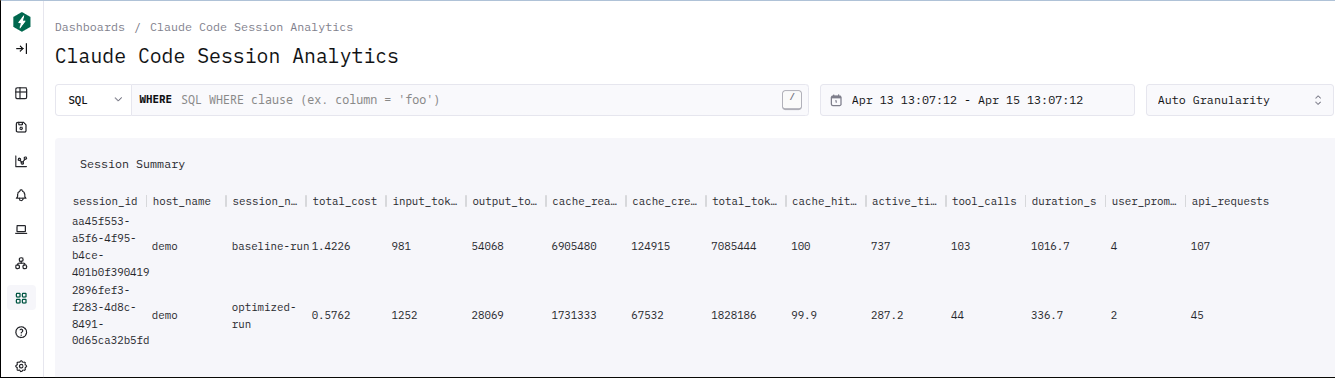
<p><img src="/assets/images/dashboard-comparison-screenshot-2.png" alt="Claude Code Session Analytics dashboard showing side-by-side comparison of baseline and optimized sessions" /></p>

<p>This isn’t about switching to a better model. Both runs used Claude Haiku (the profiler itself ran on Opus). Even with well-written prompts and good project context, there is always room to optimize — especially when working with costly models or doing repetitive, similar tasks.</p>

<p>Profiling builds your understanding of how agents actually work from the inside, and that understanding compounds. Iterative build tools can get you to a working system, but they burn tokens getting there. Profiling shows you <strong>where</strong> those tokens go, so you can engineer the waste out before scaling up.</p>

<hr />

<h3 id="the-observability-gap">The Observability Gap</h3>

<p>When you use an AI coding agent, you see two things: the prompt you typed and the output you got back. Between those two points, the agent might have made 107 API requests, spawned 3 subagents, failed 16 Bash commands, switched test frameworks mid-stream, and burned through millions of tokens — and you’d never know unless you were watching the terminal scroll by.</p>

<p>This is the observability gap. In traditional software, we solved this decades ago with APM tools, distributed tracing, and structured logging. We don’t ship services without Datadog or Grafana dashboards telling us where latency lives and where errors cluster.</p>

<p>AI coding agents have no equivalent. You get a cost number at the end of the session and a vague sense of whether it went well. If the session was expensive, you don’t know <em>why</em>. If the agent struggled, you can’t see <em>where</em>. And critically, you can’t systematically improve the next run because you have <strong>no data to act on</strong>.</p>

<p>That’s what I set out to fix.</p>

<hr />

<h3 id="the-setup-telemetry-for-claude-code">The Setup: Telemetry for Claude Code</h3>

<p>Claude Code supports <strong>OpenTelemetry</strong> — the same observability standard used across the software industry. When enabled, it exports traces, metrics, and logs covering every aspect of a session: API requests, tool calls (with command details and file paths), token usage by type, cost, duration, user prompts, and permission decisions.</p>

<p>The core requirement is a <strong>ClickHouse database</strong> — the same database <a href="https://clickhouse.com/blog/how-anthropic-is-using-clickhouse-to-scale-observability-for-ai-era">Anthropic uses internally</a> for their own Claude observability — with any OTEL-compatible collector that can write to it. The profiler queries ClickHouse directly. For this setup, I used <strong>ClickStack</strong> (ClickHouse + OTEL collector + HyperDX dashboard bundled together) for ease of setup, and ran everything in Docker containers to ensure clean, reproducible environments:</p>

<pre><code class="language-mermaid">graph LR
    subgraph Docker Network
        CS["ClickStack&lt;br/&gt;(ClickHouse + OTEL Collector&lt;br/&gt;+ HyperDX Dashboard)"]
        B["Baseline Container&lt;br/&gt;(Claude Code + Haiku)"]
        P["Profiler Container&lt;br/&gt;(Claude Code + Opus&lt;br/&gt;+ Profiler Plugin)"]
        O["Optimized Container&lt;br/&gt;(Claude Code + Haiku)"]
    end

    B --&gt;|OTEL telemetry| CS
    O --&gt;|OTEL telemetry| CS
    P --&gt;|queries ClickHouse| CS

    style CS fill:#f59e0b,stroke:#d97706,color:#000
    style B fill:#818cf8,stroke:#6366f1,color:#fff
    style P fill:#6366f1,stroke:#4f46e5,color:#fff
    style O fill:#10b981,stroke:#059669,color:#fff
</code></pre>

<p><strong>Baseline and Optimized containers</strong> each run Claude Code with Haiku and export OTEL telemetry to ClickStack. <strong>The Profiler container</strong> runs Claude Code with Opus and the profiler plugin; instead of exporting telemetry, it queries ClickHouse directly to analyze the baseline session and produce optimization artifacts. Each container mounts a shared <code class="language-plaintext highlighter-rouge">demo/</code> directory that carries configuration files forward across phases — but application code is ephemeral, so each run builds from scratch.</p>

<p>The key environment variables that unlock detailed telemetry:</p>

<div class="language-plaintext highlighter-rouge"><div class="highlight"><pre class="highlight"><code>CLAUDE_CODE_ENABLE_TELEMETRY=1
OTEL_LOG_TOOL_DETAILS=1
OTEL_LOG_USER_PROMPTS=1
CLAUDE_CODE_ENHANCED_TELEMETRY_BETA=1
</code></pre></div></div>

<p>With these enabled, every tool call, every prompt, every permission decision, and every token is captured in queryable ClickHouse tables: <code class="language-plaintext highlighter-rouge">otel_traces</code>, <code class="language-plaintext highlighter-rouge">otel_logs</code>, and <code class="language-plaintext highlighter-rouge">otel_metrics_sum</code>.</p>

<blockquote>
  <p><strong>Note:</strong> All tools used in this setup (monitoring stack, profiler plugin, container image) are linked at the end of this article.</p>
</blockquote>

<hr />

<h3 id="the-baseline-watching-an-agent-struggle">The Baseline: Watching an Agent Struggle</h3>

<p>The baseline prompt pointed to a <code class="language-plaintext highlighter-rouge">requirements.md</code> file that was deliberately lean — requirements only, no tech stack, no environment hints:</p>

<blockquote>
  <p>Build a task manager REST API in the /demo-app/ directory. It should support creating, reading, updating, and deleting tasks. Each task should have a title, description, due date, priority level, and category. Include a test suite and verify all features work by running the tests.</p>
</blockquote>

<p>Here’s what the agent actually did, reconstructed from telemetry and the session recording:</p>

<table>
  <thead>
    <tr>
      <th>Phase</th>
      <th>What Happened</th>
      <th>Tool Calls</th>
      <th>Waste</th>
    </tr>
  </thead>
  <tbody>
    <tr>
      <td>1. Discovery &amp; planning</td>
      <td>3 subagents, 2 planning cycles</td>
      <td>14</td>
      <td>Explored a non-existent directory, rejected first plan</td>
    </tr>
    <tr>
      <td>2. Environment setup</td>
      <td>Node.js installation trial-and-error</td>
      <td>14</td>
      <td><code class="language-plaintext highlighter-rouge">apt-get</code> without root, wrong Node version, asked user for help</td>
    </tr>
    <tr>
      <td>3. Code generation</td>
      <td>16 files written one at a time</td>
      <td>20</td>
      <td>Each file = separate LLM round, ~840K redundant cache reads</td>
    </tr>
    <tr>
      <td>4. Test-fix cycle</td>
      <td>Framework switch, debug spiral</td>
      <td>33</td>
      <td>Rewrote all 5 test files after choosing wrong framework</td>
    </tr>
    <tr>
      <td>5. Verification &amp; polish</td>
      <td>README, curl tests, cleanup</td>
      <td>22</td>
      <td>Required a third user prompt to add README</td>
    </tr>
  </tbody>
</table>

<p><strong>Phase 1 — Discovery and planning false starts.</strong> The agent spawned 3 subagents sequentially: one to explore the directory (which didn’t exist yet — wasted), and two Plan subagents because the first plan proposed a non-Node.js stack, which I rejected. Two full planning cycles before a single line of code was written.</p>

<p><strong>Phase 2 — The environment struggle.</strong> This was the most expensive phase. The agent tried <code class="language-plaintext highlighter-rouge">npm init</code> — failed, no Node.js. Tried <code class="language-plaintext highlighter-rouge">python3</code> — not found. Asked me what to do via <code class="language-plaintext highlighter-rouge">AskUserQuestion</code>. I said “why don’t you install nodejs.” It tried <code class="language-plaintext highlighter-rouge">apt-get install nodejs</code> — permission denied (not root). Tried the NodeSource setup script — failed. Downloaded Node.js v20 as a tarball — wrong version. Downloaded v22 — finally worked. <strong>14 Bash calls just to get a runtime installed.</strong></p>

<p><strong>Phase 3 — Code generation.</strong> Created 16 source files one at a time — db.js, config, schemas, middleware, services, controllers, routes, app.js, server.js, plus 5 test files and a helper. Each file was a separate Write call, each requiring its own LLM round. The profiler later calculated this pattern caused ~840K tokens of redundant cache reads.</p>

<p><strong>Phase 4 — The test-fix death spiral.</strong> Ran tests — failures. Node v20 didn’t support the test syntax. Switched to v22. Still failed. Reinstalled node_modules. Switched from vitest to Node’s built-in test runner. Rewrote all 5 test files. Still had failures. Edited service code, middleware, and schemas. Ran the server manually with curl to debug. Wrote a standalone Zod test script to isolate a validation issue. Eventually reached <strong>29 tests passing</strong> after <strong>33 tool calls</strong> in this cycle alone.</p>

<p><strong>Phase 5 — Verification and polish.</strong> A third user prompt was needed — “Anybody should be able to setup and use the project after going through README.MD” — because the agent hadn’t created one. More tool calls, more time, more cost.</p>

<p>The final tally: <strong>$1.42, 103 tool calls, 107 API requests, 4 user prompts (2 of them corrective interventions).</strong></p>

<hr />

<h3 id="the-profiler-cracking-open-the-black-box">The Profiler: Cracking Open the Black Box</h3>

<p>This is where the observability payoff kicks in. I ran the <a href="https://github.com/vikrantjain/claude-session-profiler">claude-session-profiler</a> plugin — it connected to ClickHouse, queried the baseline session’s telemetry, and produced a detailed analysis.</p>

<p>One of the most revealing outputs was the <strong>session flow diagram</strong> — reconstructed entirely from OTEL traces, not from source code or documentation. This is the agent’s real internal behavior as observed through telemetry:</p>

<pre><code class="language-mermaid">sequenceDiagram
    participant User
    participant Agent
    participant Tools
    participant Subagent

    Note over User,Tools: Prompt 1 — "Implement requirements.md" ($0.54, 8.5 min)
    User -&gt;&gt; Agent: Can you implement the requirement documented in @requirements.md
    Agent -&gt;&gt; Subagent: Explore /demo-app (directory doesn't exist — wasted)
    Subagent --&gt;&gt; Agent: Nothing found
    Agent -&gt;&gt; Subagent: Plan #1 — design REST API
    Subagent --&gt;&gt; Agent: Plan proposed (non-Node.js stack)
    Note over Agent,Tools: ❌ User rejects plan
    Agent -&gt;&gt; Subagent: Plan #2 — design Node.js REST API
    Subagent --&gt;&gt; Agent: Plan accepted
    Agent -&gt;&gt; Tools: Bash x7 (mkdir, npm init — 4 failures, no Node.js)
    Agent -&gt;&gt; Tools: AskUserQuestion — "Node.js not available"

    Note over User,Tools: Prompt 2 — "why don't you install nodejs" ($0.66, 7.6 min)
    User -&gt;&gt; Agent: why don't you install nodejs
    Agent -&gt;&gt; Tools: Bash (NodeSource setup — failed)
    Agent -&gt;&gt; Tools: Bash (curl node v20 .tar.xz — wrong format)
    Agent -&gt;&gt; Tools: Bash (curl node v20 .tar.gz — success)
    Agent -&gt;&gt; Tools: Bash (npm install — 18.5s)
    Agent -&gt;&gt; Tools: Write x14 (all source files, one per LLM round)
    Agent -&gt;&gt; Tools: Bash (npm test — failed, Node v20 too old)
    Agent -&gt;&gt; Tools: Bash (install Node v22)
    Agent -&gt;&gt; Tools: Bash (npm test — failed, vitest incompatible)
    Note over Agent,Tools: ❌ Switches framework: vitest → node:test
    Agent -&gt;&gt; Tools: Write x5 (rewrite ALL test files)
    Agent -&gt;&gt; Tools: Bash (npm test — still failing) x3
    Agent -&gt;&gt; Tools: Edit x3 (fix service, middleware, schema bugs)
    Agent -&gt;&gt; Tools: Bash (npm test — 29 tests pass) ✓

    Note over User,Tools: Prompt 3 — "Setup via README.MD" ($0.21, 2.3 min)
    User -&gt;&gt; Agent: Anybody should be able to setup and use the project after going through README.MD
    Agent -&gt;&gt; Tools: Read + Edit README x3

    Note over User,Tools: Prompt 4 — "Thanks." ($0.01)
    User -&gt;&gt; Agent: Thanks.
</code></pre>

<p><strong>You don’t need to read source code to understand how an AI agent works internally.</strong> Point the profiler at <strong>any session</strong> and get a diagram like this — the agent’s real execution flow for your specific task. This one shows three subagents spawned sequentially, a rejected plan, 14 files written one at a time, a full test framework migration mid-stream, and a debug spiral — all triggered by a five-word user correction.</p>

<p>The profiler’s per-prompt cost breakdown quantifies the damage:</p>

<table>
  <thead>
    <tr>
      <th>#</th>
      <th>Prompt</th>
      <th>LLM Calls</th>
      <th>Tool Calls</th>
      <th>Cost</th>
      <th>Time</th>
    </tr>
  </thead>
  <tbody>
    <tr>
      <td>1</td>
      <td>“Can you implement the requirement documented in @requirements.md”</td>
      <td>25</td>
      <td>22</td>
      <td>$0.54</td>
      <td>8.5 min</td>
    </tr>
    <tr>
      <td>2</td>
      <td>“why don’t you install nodejs”</td>
      <td>66</td>
      <td>65</td>
      <td>$0.66</td>
      <td>7.6 min</td>
    </tr>
    <tr>
      <td>3</td>
      <td>“Anybody should be able to setup and use the project after going through README.MD”</td>
      <td>15</td>
      <td>14</td>
      <td>$0.21</td>
      <td>2.3 min</td>
    </tr>
    <tr>
      <td>4</td>
      <td>“Thanks.”</td>
      <td>1</td>
      <td>0</td>
      <td>$0.01</td>
      <td>0.03 min</td>
    </tr>
  </tbody>
</table>

<p><strong>Prompt 2 — a five-word user correction — consumed 46% of the entire session cost.</strong> It triggered 66 LLM calls because the agent interpreted it as a green light to do <em>everything</em>: install Node.js, write all code, set up tests, debug failures, and verify — all within a single interaction where context grew from 49K to 97K tokens.</p>

<p>Beyond the per-prompt breakdown, the profiler surfaced specific patterns:</p>

<p><strong>33% Bash failure rate.</strong> 16 out of 48 Bash calls failed — 6 from environment probing (trying commands that didn’t exist), 2 from wrong Node.js archive format, 6 from test runner failures, 2 miscellaneous. Each failure added error output to context and triggered at least one additional LLM call to diagnose and retry.</p>

<p><strong>2.7 minutes of permission wait time.</strong> The user approved 47 out of 48 Bash calls (one was auto-allowed). At ~3.4 seconds average per approval, that’s 2.7 minutes of a human clicking “Yes” repeatedly for commands that were always going to be approved.</p>

<p><strong>The vitest-to-node:test rewrite.</strong> The agent chose vitest as the test framework, then discovered it didn’t work in the container environment. It uninstalled vitest and rewrote all 5 test files using node:test — approximately 12 LLM rounds and ~10K output tokens of completely duplicated work.</p>

<hr />

<h3 id="three-targeted-fixes">Three Targeted Fixes</h3>

<p>The profiler didn’t just identify problems — it produced three artifacts that encode the fixes directly into the project. Each targets a specific waste pattern: permission delays, environment and tech stack guessing, and prompt ambiguity.</p>

<p><strong>1. Permission allow rules</strong> (<code class="language-plaintext highlighter-rouge">settings.local.json</code>)</p>

<div class="language-json highlighter-rouge"><div class="highlight"><pre class="highlight"><code><span class="p">{</span><span class="w">
  </span><span class="nl">"permissions"</span><span class="p">:</span><span class="w"> </span><span class="p">{</span><span class="w">
    </span><span class="nl">"allow"</span><span class="p">:</span><span class="w"> </span><span class="p">[</span><span class="w">
      </span><span class="s2">"Bash(npm *)"</span><span class="p">,</span><span class="w"> </span><span class="s2">"Bash(node *)"</span><span class="p">,</span><span class="w"> </span><span class="s2">"Bash(curl:*)"</span><span class="p">,</span><span class="w">
      </span><span class="s2">"Bash(mkdir *)"</span><span class="p">,</span><span class="w"> </span><span class="s2">"Bash(ls *)"</span><span class="p">,</span><span class="w"> </span><span class="s2">"Bash(find *)"</span><span class="p">,</span><span class="w">
      </span><span class="s2">"Bash(cat *)"</span><span class="p">,</span><span class="w"> </span><span class="s2">"Bash(export PATH=*)"</span><span class="w">
    </span><span class="p">]</span><span class="w">
  </span><span class="p">}</span><span class="w">
</span><span class="p">}</span><span class="w">
</span></code></pre></div></div>

<p>Auto-approves standard development commands. Eliminates ~2.7 minutes of permission prompts per session.</p>

<p><strong>2. CLAUDE.md project context</strong> (22 lines)</p>

<div class="language-markdown highlighter-rouge"><div class="highlight"><pre class="highlight"><code><span class="gh"># Project: demo-app (Task Manager REST API)</span>

<span class="gu">## Environment</span>
<span class="p">-</span> Node.js is NOT pre-installed. Download a binary release from
  https://nodejs.org (linux-x64 .tar.gz) to /home/claude/, extract it,
  and add its bin/ directory to PATH before running any node/npm commands.
<span class="p">-</span> No apt-get/sudo access. Do not attempt package manager installs.

<span class="gu">## Tech Stack</span>
<span class="p">-</span> Runtime: Node.js (v22+)
<span class="p">-</span> Framework: Express
<span class="p">-</span> Database: better-sqlite3 (SQLite)
<span class="p">-</span> Validation: Zod
<span class="p">-</span> Test runner: Node built-in (node:test + node:assert)
  -- do NOT use vitest, jest, or mocha

<span class="gu">## Workflow Guidance</span>
<span class="p">-</span> For greenfield projects, skip Explore subagents
<span class="p">-</span> Batch multiple file writes into a single LLM response
</code></pre></div></div>

<p>Three lessons encoded: (a) how to install Node.js without probing failures, (b) which tech stack to use without guessing, (c) workflow patterns to avoid the one-file-per-call overhead.</p>

<p><strong>3. Refined requirements.md</strong> (from 1 line to structured)</p>

<p>Before:</p>
<blockquote>
  <p>Build a task manager REST API in the /demo-app/ directory. It should support creating, reading, updating, and deleting tasks. Each task should have a title, description, due date, priority level, and category. Include a test suite and verify all features work by running the tests.</p>
</blockquote>

<p>After:</p>
<div class="language-markdown highlighter-rouge"><div class="highlight"><pre class="highlight"><code>Build a task manager REST API in the /demo-app/ directory.

<span class="gu">## Requirements</span>
<span class="p">-</span> CRUD operations for tasks
<span class="p">-</span> Each task has: title, description, due date, priority level, and category
<span class="p">-</span> Include a test suite and verify all features pass

<span class="gu">## Implementation</span>
<span class="p">-</span> Node.js (v22+) with Express, better-sqlite3, and Zod for validation
<span class="p">-</span> Use Node's built-in test runner (node:test + node:assert) with supertest
<span class="p">-</span> Node.js is NOT pre-installed -- download the linux-x64 binary from
  nodejs.org to /home/claude/ and add to PATH
<span class="p">-</span> Create a README.md with setup instructions
</code></pre></div></div>

<p>Every ambiguity that caused thrashing in the baseline is now resolved upfront. The profiler predicted this combination would cut cost roughly in half (~$0.65-0.75) and finish in 8-10 minutes.</p>

<hr />

<h3 id="the-optimized-run-same-task-same-model-different-result">The Optimized Run: Same Task, Same Model, Different Result</h3>

<p>Clean directory — no pre-existing code. Same model. Same prompt structure. The only differences: the three artifacts above.</p>

<p>The contrast was immediate. <strong>One planning cycle</strong> instead of two — CLAUDE.md told it to skip Explore for greenfield projects. <strong>Node.js installed in one download</strong> — though the model chose v24.14.1 instead of the recommended v22, it knew to use a tarball and had the PATH instructions ready. No <code class="language-plaintext highlighter-rouge">apt-get</code> attempts, no <code class="language-plaintext highlighter-rouge">AskUserQuestion</code>, no user intervention.</p>

<p>Code generation was leaner: <strong>8 source files</strong> with a flatter architecture (validators, routes, db, app, server, tests, README) versus the baseline’s 16 files with separate config, schemas, middleware, services, and controllers layers.</p>

<p>The one surprise: <code class="language-plaintext highlighter-rouge">npm install</code> failed because <strong>better-sqlite3 had no prebuilt binary for Node v24.14.1</strong>, and the container lacked compilation tools (no node-gyp, python3, make, or g++). The agent recognized the root cause in one attempt, pivoted to <strong>sql.js</strong> (a pure JavaScript/WASM SQLite implementation requiring zero native dependencies), created a <code class="language-plaintext highlighter-rouge">db-wrapper.js</code> abstraction layer, adapted 5 files, and had all <strong>26 tests passing</strong>. The entire test-fix cycle took 15 tool calls — compared to the baseline’s 33.</p>

<p>This is worth noting: the profiler recommended better-sqlite3 based on what the baseline used, but the model’s choice of a newer Node.js version created an incompatibility the profiler couldn’t have predicted. The model handled this gracefully — it diagnosed the failure, chose a pragmatic alternative, and adapted in one focused pass rather than thrashing.</p>

<p>Final output: “I’ve successfully implemented the Task Manager REST API.” Server boots cleanly. All tests pass. README with setup instructions included. <strong>Zero user intervention.</strong></p>

<hr />

<h3 id="the-numbers">The Numbers</h3>

<table>
  <thead>
    <tr>
      <th>Metric</th>
      <th>Baseline</th>
      <th>Optimized</th>
      <th>Change</th>
    </tr>
  </thead>
  <tbody>
    <tr>
      <td><strong>Total Cost</strong></td>
      <td>$1.42</td>
      <td>$0.58</td>
      <td><strong>-59%</strong></td>
    </tr>
    <tr>
      <td><strong>Duration</strong></td>
      <td>18.6 min</td>
      <td>6.6 min</td>
      <td><strong>-64%</strong></td>
    </tr>
    <tr>
      <td><strong>Active Time</strong></td>
      <td>737s</td>
      <td>287s</td>
      <td><strong>-61%</strong></td>
    </tr>
    <tr>
      <td><strong>Tool Calls</strong></td>
      <td>103</td>
      <td>44</td>
      <td><strong>-57%</strong></td>
    </tr>
    <tr>
      <td><strong>API Requests</strong></td>
      <td>107</td>
      <td>45</td>
      <td><strong>-58%</strong></td>
    </tr>
    <tr>
      <td><strong>Output Tokens</strong></td>
      <td>54,068</td>
      <td>28,069</td>
      <td><strong>-48%</strong></td>
    </tr>
    <tr>
      <td><strong>User Prompts</strong></td>
      <td>4</td>
      <td>2</td>
      <td><strong>-50%</strong></td>
    </tr>
    <tr>
      <td><strong>User Interventions</strong></td>
      <td>2</td>
      <td>0</td>
      <td><strong>-100%</strong></td>
    </tr>
  </tbody>
</table>

<p>The profiler predicted ~$0.65-0.75 cost and 8-10 minutes. Actual: $0.58 and 6.6 minutes. The cost prediction was within range; the time prediction was conservative. This <strong>validates the telemetry-based analysis as a useful forecasting tool</strong>, not just a post-hoc report.</p>

<p>The tool usage shift tells the structural story:</p>

<table>
  <thead>
    <tr>
      <th>Tool</th>
      <th>Baseline</th>
      <th>Optimized</th>
    </tr>
  </thead>
  <tbody>
    <tr>
      <td>Bash</td>
      <td>48</td>
      <td>19</td>
    </tr>
    <tr>
      <td>Write</td>
      <td>28</td>
      <td>10</td>
    </tr>
    <tr>
      <td>Edit</td>
      <td>11</td>
      <td>10</td>
    </tr>
    <tr>
      <td>Read</td>
      <td>8</td>
      <td>2</td>
    </tr>
    <tr>
      <td>Agent (subagents)</td>
      <td>3</td>
      <td>1</td>
    </tr>
    <tr>
      <td>AskUserQuestion</td>
      <td>1</td>
      <td>0</td>
    </tr>
  </tbody>
</table>

<p>Fewer Bash calls because the agent wasn’t probing a mystery environment. Fewer Writes because it created 8 files instead of 16. Fewer subagents because it didn’t need to re-plan. Zero user questions because CLAUDE.md answered them before they were asked.</p>

<hr />

<h3 id="what-this-means-in-practice">What This Means in Practice</h3>

<p>The 60% cost reduction on a $1.42 Haiku session saves $0.84. That’s not going to change anyone’s budget. But the pattern scales — the waste patterns the profiler found (environment probing, framework guessing, one-file-per-call overhead) aren’t specific to this task. They’re the agent’s default behavior when it lacks context, and they repeat across every session until you fix them. A well-crafted CLAUDE.md eliminates entire categories of waste on every subsequent run.</p>

<p>More importantly, the profiling reveals <strong>structural inefficiencies that compound with model capability and task complexity.</strong> A 33% Bash failure rate on a simple CRUD task means the same failure rate on a multi-service migration — but with 10x more tool calls, the cost of each wasted retry multiplies. The patterns are the same; the stakes are not.</p>

<p>The profiler’s real value isn’t the cost number. It’s the <strong>visibility</strong>. When you can see that 46% of your cost came from a single corrective prompt, or that 33% of Bash calls failed, or that the agent rewrote all test files because it guessed the wrong framework — you know exactly what to fix. Without that data, you’re <strong>optimizing blind</strong>.</p>

<hr />

<h3 id="closing-thoughts">Closing Thoughts</h3>

<p>AI coding agents are powerful, but they’re opaque by default. You interact with a prompt-and-response interface while the agent makes hundreds of internal decisions — tool choices, error recovery strategies, architecture patterns, technology selections — that you never see and can’t influence until something goes wrong.</p>

<p>Telemetry changes that dynamic. With OTEL tracing, every tool call, every token, every permission decision, and every failure is captured and queryable. The <a href="https://github.com/vikrantjain/claude-session-profiler">profiler plugin</a> turns that raw data into actionable artifacts — CLAUDE.md guidance, permission rules, refined prompts — that encode lessons learned into the project itself.</p>

<p>This is the same shift that happened in backend engineering when we went from “check the logs” to structured observability. Once you can see what’s happening inside the system, you stop guessing and start engineering.</p>

<blockquote>
  <p><strong>Personal Insight:</strong> Building the <a href="https://github.com/vikrantjain/claude-code-monitoring">monitoring stack</a> and <a href="https://github.com/vikrantjain/claude-session-profiler">profiler plugin</a> started as curiosity — I wanted to understand what Claude Code was actually doing during those long sessions where the terminal scrolled faster than I could read.</p>

  <p>The biggest surprise wasn’t the waste itself — it was <em>how predictable</em> it is. The same failure modes show up in nearly every session I’ve profiled since: probing for tools that aren’t installed, guessing tech choices that could have been specified, writing files one at a time when they could be batched. Once you see that, CLAUDE.md stops being a nice-to-have and becomes the single highest-leverage artifact in your project.</p>
</blockquote>

<p>The tools referenced in this article:</p>
<ul>
  <li><strong><a href="https://github.com/vikrantjain/claude-code-monitoring">claude-code-monitoring</a></strong> — ClickStack docker-compose + HyperDX dashboard for Claude Code telemetry</li>
  <li><strong><a href="https://github.com/vikrantjain/claude-session-profiler">claude-session-profiler</a></strong> — Claude Code plugin that analyzes session telemetry and produces optimization artifacts</li>
  <li><strong><a href="https://github.com/vikrantjain/claude-code-container">claude-code-container</a></strong> — Docker container for running Claude Code in isolated, reproducible environments</li>
</ul>]]></content><author><name>Vikrant Jain</name></author><category term="claude-code" /><category term="claudeai" /><category term="ai-agents" /><category term="observability" /><category term="cost-optimization" /><category term="llm" /><summary type="html"><![CDATA[Profiling Claude Code sessions with OpenTelemetry reveals where tokens and time really go — and how to engineer the waste out]]></summary></entry><entry><title type="html">I Built a Way for Claude Code Agents to Talk to Each Other Across Machines</title><link href="https://vikrantjain.github.io/distributed-claude-code-agents-across-machines/" rel="alternate" type="text/html" title="I Built a Way for Claude Code Agents to Talk to Each Other Across Machines" /><published>2026-04-02T00:00:00+00:00</published><updated>2026-04-02T00:00:00+00:00</updated><id>https://vikrantjain.github.io/distributed-claude-code-agents-across-machines</id><content type="html" xml:base="https://vikrantjain.github.io/distributed-claude-code-agents-across-machines/"><![CDATA[<p>Claude Code can already run <a href="https://code.claude.com/docs/en/sub-agents">sub-agents</a> — specialized workers with isolated context that execute tasks and report back. It can also run experimental <a href="https://code.claude.com/docs/en/agent-teams">agent teams</a> — multiple Claude Code sessions coordinating via direct messaging and shared task lists. Both are powerful. Both are confined to a single machine.</p>

<p>But what happens when the work spans multiple machines? When you want a manager agent on one host coordinating developer agents on others — each running their own internal agent teams, writing to shared workspaces, negotiating API contracts in real time?</p>

<p>That’s the gap. And I used another experimental Claude Code capability — <a href="https://code.claude.com/docs/en/channels">channels</a> — to fill it.</p>

<hr />

<h3 id="the-missing-step">The Missing Step</h3>

<p>Claude Code’s agent capabilities today have a clear hierarchy:</p>

<p><strong><a href="https://code.claude.com/docs/en/sub-agents">Sub-agents</a></strong> — specialized workers spawned by the main agent with their own context window, custom tools, and system prompts. They execute a task and return a summary to the caller. But they can’t spawn other sub-agents (no nesting), and they can’t talk to each other — they only report back to whoever spawned them.</p>

<p><strong><a href="https://code.claude.com/docs/en/agent-teams">Agent teams</a></strong> (experimental) — a step further. Multiple Claude Code sessions coordinate through direct messaging and a shared task list. Teammates can talk to each other, not just back to the lead. But the entire team still runs on one machine, in one terminal session.</p>

<p><strong>Distributed agents</strong> — multiple Claude Code instances on different machines, each potentially running its own internal sub-agents or agent teams, collaborating across the network in real time. This doesn’t exist out of the box.</p>

<p>The piece that makes it possible is <strong><a href="https://code.claude.com/docs/en/channels">channels</a></strong> — an experimental research preview that lets external events push into a running Claude Code session via MCP servers. Channels were designed for things like chat platforms (Telegram, Discord), but the underlying mechanism is general: any MCP server can send channel notifications into Claude’s conversation. That’s the hook I built on.</p>

<p>The jump from “agent teams on one machine” to “distributed agent teams across machines” is the same jump that software organizations made decades ago — and it’s worth looking at that parallel.</p>

<hr />

<h3 id="the-model-we-already-know">The Model We Already Know</h3>

<p>Distributed human teams are not a new idea. Every engineering organization of meaningful size runs some version of this:</p>

<pre><code class="language-mermaid">graph LR
    AM["🏗️ Architect / Manager&lt;br/&gt;Coordination &amp; Vision"]

    AM &lt;--&gt;|defines tasks &amp; reviews| T1
    AM &lt;--&gt;|defines tasks &amp; reviews| T2
    AM &lt;--&gt;|defines tasks &amp; reviews| T3

    subgraph T1["Team 1 — Frontend"]
        direction TB
        T1L["Tech Lead"]
        T1D1["Developer"]
        T1D2["Developer"]
        T1L &lt;--&gt; T1D1
        T1L &lt;--&gt; T1D2
        T1D1 &lt;--&gt; T1D2
    end

    subgraph T2["Team 2 — Backend API"]
        direction TB
        T2L["Tech Lead"]
        T2D1["Developer"]
        T2D2["Developer"]
        T2L &lt;--&gt; T2D1
        T2L &lt;--&gt; T2D2
        T2D1 &lt;--&gt; T2D2
    end

    subgraph T3["Team 3 — Infrastructure"]
        direction TB
        T3L["Tech Lead"]
        T3D1["Developer"]
        T3D2["Developer"]
        T3L &lt;--&gt; T3D1
        T3L &lt;--&gt; T3D2
        T3D1 &lt;--&gt; T3D2
    end

    T1 &lt;--&gt;|API contracts| T2
    T2 &lt;--&gt;|deployment| T3
    T3 &lt;--&gt;|hosting &amp; CI/CD| T1

    style AM fill:#6366f1,stroke:#4f46e5,color:#fff
    style T1L fill:#6366f1,stroke:#4f46e5,color:#fff
    style T2L fill:#6366f1,stroke:#4f46e5,color:#fff
    style T3L fill:#6366f1,stroke:#4f46e5,color:#fff
    style T1D1 fill:#818cf8,stroke:#6366f1,color:#fff
    style T1D2 fill:#818cf8,stroke:#6366f1,color:#fff
    style T2D1 fill:#818cf8,stroke:#6366f1,color:#fff
    style T2D2 fill:#818cf8,stroke:#6366f1,color:#fff
    style T3D1 fill:#818cf8,stroke:#6366f1,color:#fff
    style T3D2 fill:#818cf8,stroke:#6366f1,color:#fff
</code></pre>

<p>A <strong>senior architect or manager</strong> holds the vision and breaks work into components. <strong>Team leads</strong> manage their teams, each responsible for a service or layer. <strong>Developers</strong> within each team collaborate closely, and teams coordinate with each other through well-defined contracts — API specs, shared schemas, deployment interfaces.</p>

<p>This model works. It scales. It’s how we build complex systems with humans.</p>

<p>Now look at what a single Claude Code instance already does internally: a <strong>main agent</strong> (the team lead) spawning <strong><a href="https://code.claude.com/docs/en/sub-agents">sub-agents</a></strong> (the developers), each with a defined role and scoped context. With <strong><a href="https://code.claude.com/docs/en/agent-teams">agent teams</a></strong>, teammates even message each other directly — just like developers within a team collaborating on interfaces.</p>

<p>The structure is the same. Each Claude Code instance is already a team. The only thing missing was the communication layer between teams — the equivalent of cross-team API contracts and coordination meetings. That’s what <a href="https://code.claude.com/docs/en/channels">channels</a> and <code class="language-plaintext highlighter-rouge">claude-code-chat</code> provide. Connect multiple Claude Code instances via a broker, and each instance becomes a node in the distributed team model. Internally, each runs its own agent team. Externally, they coordinate with other instances through messages.</p>

<hr />

<h3 id="what-i-built">What I Built</h3>

<p><strong><code class="language-plaintext highlighter-rouge">claude-code-chat</code></strong> — a lightweight bridge that lets Claude Code instances discover each other and exchange messages in real time, across machines.</p>

<p>It has two components:</p>

<p><strong>A WebSocket broker</strong> (<code class="language-plaintext highlighter-rouge">broker.ts</code>, ~80 lines) — a central message relay. Agents connect, register a name, and send messages — either broadcast to everyone or directed to a specific recipient. The broker tracks who’s online and notifies everyone when agents join or leave. No persistent storage, no authentication, no external dependencies. Just Bun’s built-in WebSocket server.</p>

<p><strong>An MCP <a href="https://code.claude.com/docs/en/channels">channel</a> server</strong> (<code class="language-plaintext highlighter-rouge">client.ts</code>, ~110 lines) — runs as an MCP server alongside each Claude Code instance. It connects to the broker and exposes two tools to Claude: <code class="language-plaintext highlighter-rouge">send_message</code> (with an optional <code class="language-plaintext highlighter-rouge">to</code> for directed messages) and <code class="language-plaintext highlighter-rouge">list_participants</code>. When messages arrive from the broker, they’re delivered to Claude as MCP channel notifications — appearing inline in the conversation as <code class="language-plaintext highlighter-rouge">&lt;channel&gt;</code> tags.</p>

<p>That’s it. Two files, ~190 lines of TypeScript, one dependency beyond the MCP SDK.</p>

<blockquote>
  <p><strong>Important caveat:</strong> MCP channels are an <strong>experimental research preview</strong> in Claude Code. Running this requires the <code class="language-plaintext highlighter-rouge">--dangerously-load-development-channels</code> flag. This is not a production-ready feature — it’s an early look at what’s coming. The API may change, and the flag name tells you exactly how Anthropic feels about its stability right now.</p>
</blockquote>

<hr />

<h3 id="architecture">Architecture</h3>

<pre><code class="language-mermaid">graph LR
    subgraph Machine_A["Machine A — Manager"]
        CA["Claude Code&lt;br/&gt;(manager)"] &lt;--&gt; MCA["MCP Server&lt;br/&gt;(client.ts)"]
    end

    subgraph Broker["Broker (any host)"]
        B["broker.ts&lt;br/&gt;WebSocket relay"]
    end

    subgraph Machine_B["Machine B — Alice's Team"]
        direction TB
        CB["Claude Code&lt;br/&gt;(alice)"] &lt;--&gt; MCB["MCP Server&lt;br/&gt;(client.ts)"]
        CB --&gt;|spawns| SA1["Sub-agent"]
        CB --&gt;|spawns| SA2["Sub-agent"]
    end

    subgraph Machine_C["Machine C — Bob's Team"]
        direction TB
        CC["Claude Code&lt;br/&gt;(bob)"] &lt;--&gt; MCC["MCP Server&lt;br/&gt;(client.ts)"]
        CC --&gt;|spawns| SB1["Sub-agent"]
        CC --&gt;|spawns| SB2["Sub-agent"]
    end

    MCA &lt;--&gt;|WebSocket| B
    MCB &lt;--&gt;|WebSocket| B
    MCC &lt;--&gt;|WebSocket| B

    style CA fill:#6366f1,stroke:#4f46e5,color:#fff
    style CB fill:#6366f1,stroke:#4f46e5,color:#fff
    style CC fill:#6366f1,stroke:#4f46e5,color:#fff
    style MCA fill:#10b981,stroke:#059669,color:#fff
    style MCB fill:#10b981,stroke:#059669,color:#fff
    style MCC fill:#10b981,stroke:#059669,color:#fff
    style B fill:#f59e0b,stroke:#d97706,color:#000
    style SA1 fill:#818cf8,stroke:#6366f1,color:#fff
    style SA2 fill:#818cf8,stroke:#6366f1,color:#fff
    style SB1 fill:#818cf8,stroke:#6366f1,color:#fff
    style SB2 fill:#818cf8,stroke:#6366f1,color:#fff
</code></pre>

<p>Each Claude Code instance runs its own <code class="language-plaintext highlighter-rouge">client.ts</code> as an MCP server, connecting to a single broker over WebSocket. But notice the shape of each machine — alice and bob aren’t solo agents. Each can spawn its own <a href="https://code.claude.com/docs/en/sub-agents">sub-agents</a> or run an <a href="https://code.claude.com/docs/en/agent-teams">agent team</a> internally, just like a team lead managing developers. The broker sits between these teams as a pure relay — it doesn’t interpret messages, store history, or make routing decisions beyond “send to this name” or “send to everyone.”</p>

<p><strong>Why a central broker instead of peer-to-peer?</strong> Simplicity. Agents don’t need to know each other’s addresses. They connect to one endpoint, register a name, and start talking. The broker handles discovery (<code class="language-plaintext highlighter-rouge">list_participants</code>) and routing. Adding a new agent means starting another Claude Code instance pointed at the same broker — no reconfiguration.</p>

<p><strong>How messages reach Claude.</strong> When an agent sends a message, it travels: Claude tool call → <code class="language-plaintext highlighter-rouge">client.ts</code> → WebSocket → broker → WebSocket → recipient’s <code class="language-plaintext highlighter-rouge">client.ts</code> → MCP channel notification → Claude sees it as a <code class="language-plaintext highlighter-rouge">&lt;channel&gt;</code> tag in the conversation. The whole round trip happens in milliseconds.</p>

<p><strong>The MCP channel integration is what makes this work naturally.</strong> Messages don’t arrive as tool results that Claude has to poll for. They arrive as channel notifications — inline in the conversation, tagged with the sender’s name. Claude reads them the way it reads any other context and decides how to respond. No special handling, no polling loops, no prompt engineering to make the agent “check for messages.”</p>

<hr />

<h3 id="the-demo-agents-building-an-app-together">The Demo: Agents Building an App Together</h3>

<p>The repo includes <code class="language-plaintext highlighter-rouge">start-collab.sh</code> — a tmux-based launcher that spins up four Docker containers on a shared network: the broker, a <strong>manager</strong> agent, and two developer agents (<strong>alice</strong> and <strong>bob</strong>). Each agent gets a system prompt defining its role. Since agents run with <code class="language-plaintext highlighter-rouge">--dangerously-skip-permissions</code> (full tool access), Docker provides the sandbox — each container runs as a non-root user, isolating the agent from the host system.</p>

<p>Here’s what happens when you tell the manager to build a counter app with a backend API and HTML frontend:</p>

<p><strong>Discovery.</strong> The manager uses <code class="language-plaintext highlighter-rouge">list_participants</code> and sees alice and bob are online.</p>

<blockquote>
  <p><strong>Manager → alice:</strong> Build the backend API for a counter app. Create a <code class="language-plaintext highlighter-rouge">/api/count</code> endpoint that supports GET (return current count) and POST (increment and return new count). Store the count in memory. Write the code to <code class="language-plaintext highlighter-rouge">/app/workspace/server.ts</code>. Message me when done.</p>
</blockquote>

<blockquote>
  <p><strong>Manager → bob:</strong> Build the HTML frontend for a counter app. It should display the current count, have an Increment button, and fetch from <code class="language-plaintext highlighter-rouge">/api/count</code>. Write the code to <code class="language-plaintext highlighter-rouge">/app/workspace/index.html</code>. Message me when done.</p>
</blockquote>

<p><strong>Contract negotiation.</strong> Before coding, the developers talk to each other:</p>

<blockquote>
  <p><strong>alice → bob:</strong> I’ll expose GET <code class="language-plaintext highlighter-rouge">/api/count</code> returning <code class="language-plaintext highlighter-rouge">{ count: number }</code> and POST <code class="language-plaintext highlighter-rouge">/api/count</code> returning the same shape. The server will run on port 3000. Does that work for your frontend?</p>
</blockquote>

<blockquote>
  <p><strong>bob → alice:</strong> Works for me. I’ll fetch from <code class="language-plaintext highlighter-rouge">http://localhost:3000/api/count</code>. I’m assuming you’ll handle CORS — can you add <code class="language-plaintext highlighter-rouge">Access-Control-Allow-Origin: *</code>?</p>
</blockquote>

<blockquote>
  <p><strong>alice → bob:</strong> Done, I’ll include CORS headers.</p>
</blockquote>

<p><strong>Parallel building.</strong> Both agents write code simultaneously to the shared <code class="language-plaintext highlighter-rouge">/app/workspace</code> directory. Alice creates <code class="language-plaintext highlighter-rouge">server.ts</code>, Bob creates <code class="language-plaintext highlighter-rouge">index.html</code>. They work independently because they agreed on the contract upfront.</p>

<p><strong>Completion and verification.</strong> Each developer messages the manager when done. The manager reviews the files in the workspace, runs the server, opens the frontend, tests the increment flow, and either approves or sends issues back for fixing.</p>

<p>This is the same workflow a human team follows — task breakdown, contract agreement, parallel execution, integration testing. The difference is it happens in minutes instead of days, and the “team” is three Claude Code instances coordinating over WebSocket. You can watch a <a href="#see-it-in-action">recording of this collaboration</a> at the end of the article.</p>

<hr />

<h3 id="what-i-learned">What I Learned</h3>

<p><strong>MCP channels change the interaction model fundamentally.</strong> Without channels, you’d need agents to poll for messages via tool calls — creating awkward loops and timing issues. Channels make messages arrive naturally as part of the conversation flow. Claude just <em>sees</em> them and responds. This is the difference between “chat” and “polling an inbox.”</p>

<p><strong>Broadcast + directed messaging is the right default.</strong> Early on, I considered only directed messages. But broadcast is essential for the organic collaboration you see in real teams — when alice and bob negotiate an API contract, the manager overhears and stays in context. Directed messages handle the cases where you need private coordination.</p>

<p><strong>Ephemeral is fine for v1.</strong> No message history means late-joining agents miss earlier context. In practice, this hasn’t been a problem for the demo scenarios — agents establish context quickly through <code class="language-plaintext highlighter-rouge">list_participants</code> and direct questions. Persistent history is a natural v2 addition (in-memory buffer or SQLite on the broker), but it’s not blocking useful work today.</p>

<p><strong>The 190-line constraint is a feature.</strong> The entire system is small enough that any developer can read and understand it in minutes. There’s no framework to learn, no configuration to tune, no infrastructure to deploy beyond a single process. This matters for a proof-of-concept that’s demonstrating a new pattern.</p>

<hr />

<h3 id="limitations">Limitations</h3>

<p><strong>Channels are experimental.</strong> The <code class="language-plaintext highlighter-rouge">--dangerously-load-development-channels</code> flag exists because MCP channels are a research preview. The API may change. Build on this with that understanding.</p>

<p><strong>No authentication.</strong> The broker accepts any connection. This is fine for a trusted LAN or Docker network, not for anything exposed to the internet.</p>

<p><strong>No persistence.</strong> Messages are fire-and-forget. If an agent is offline when a message is sent, it’s lost.</p>

<p><strong>Single broker.</strong> No clustering, no failover. The broker is a single process. For a proof-of-concept, this is acceptable. For production use, you’d want redundancy.</p>

<hr />

<h3 id="quick-start">Quick Start</h3>

<p>You need Docker, tmux, and a Claude Code OAuth token. Clone the repo, export your token, run <code class="language-plaintext highlighter-rouge">./start-collab.sh</code>, and give the manager a task in its tmux pane. The full setup instructions are in the <a href="https://github.com/vikrantjain/claude-code-chat">README</a> — it’s designed to get you running in under five minutes.</p>

<hr />

<h3 id="closing-thoughts">Closing Thoughts</h3>

<p>What started as a question — “can Claude Code instances talk to each other?” — turned into a working proof-of-concept for distributed AI teams. The architecture mirrors what we’ve been doing with human teams for decades: a coordinator breaking down work, developers negotiating interfaces, parallel execution against shared contracts.</p>

<p>The interesting part isn’t the WebSocket broker — that’s deliberately trivial. The interesting part is that <strong>Claude Code agents, given nothing more than two messaging tools and a system prompt, naturally fall into the same coordination patterns that human teams use.</strong> They discover each other, negotiate contracts, divide work, build in parallel, and report back. Nobody programmed that workflow — it emerges from the combination of capable agents and a communication channel.</p>

<p>The building blocks are already here. <a href="https://code.claude.com/docs/en/sub-agents">Sub-agents</a> give each Claude Code instance an internal team of specialized workers. <a href="https://code.claude.com/docs/en/agent-teams">Agent teams</a> add peer-to-peer coordination within a single machine. <a href="https://code.claude.com/docs/en/channels">Channels</a> — the experimental capability I built on — provide the push-based communication layer that makes cross-machine messaging possible. Stack these together, and the distributed human team model from the diagram above isn’t a metaphor — it’s an architecture you can run today.</p>

<p>Channels are experimental. Agent teams are experimental. The pieces are early and rough. But they exist, they work, and the direction is clear. This project is a proof-of-concept for where AI-driven development is heading.</p>

<p>The code is <a href="https://github.com/vikrantjain/claude-code-chat">open source</a>. It’s ~190 lines. Read it, run it, break it, extend it.</p>

<blockquote>
  <p><strong>Personal Insight:</strong> I’ve written before about how <a href="/ai-efficiency-organizational-change/">AI agents mirror organizational structures</a> — replacing the coordination overhead of large teams with scoped context and automated orchestration. Building <code class="language-plaintext highlighter-rouge">claude-code-chat</code> made that abstract idea concrete. Each Claude Code instance already behaves like a team — a lead coordinating specialized workers. Channels gave me the bridge to connect those teams across machines. When I watched three instances negotiate an API contract without any human intervention, it stopped being a prediction about the future and became something I could point at and say: “this is how it works now.”</p>
</blockquote>

<hr />

<h3 id="see-it-in-action">See It In Action</h3>

<p>Watch the collaboration session as scripted in the <a href="https://github.com/vikrantjain/claude-code-chat?tab=readme-ov-file#example-collaborative-app-development">project README</a> — three Claude Code instances coordinating a full-stack feature in real-time:</p>

<p><a href="https://asciinema.org/a/tI80IiE06r860gJP"><img src="https://asciinema.org/a/tI80IiE06r860gJP.svg" alt="asciicast" /></a></p>]]></content><author><name>Vikrant Jain</name></author><category term="claude-code" /><category term="ai-agents" /><category term="ai" /><category term="distributed-systems" /><category term="ai-tools" /><summary type="html"><![CDATA[I connected multiple Claude Code instances across machines using MCP channels and a WebSocket broker. Here's how distributed AI teams work.]]></summary></entry><entry><title type="html">What Happens After You Hit Enter in Claude Code?</title><link href="https://vikrantjain.github.io/inside-claude-code-agentic-loop/" rel="alternate" type="text/html" title="What Happens After You Hit Enter in Claude Code?" /><published>2026-03-23T00:00:00+00:00</published><updated>2026-03-23T00:00:00+00:00</updated><id>https://vikrantjain.github.io/inside-claude-code-agentic-loop</id><content type="html" xml:base="https://vikrantjain.github.io/inside-claude-code-agentic-loop/"><![CDATA[<p>Most Claude Code users experience it as a conversation — type a prompt, get code back. But underneath that simple interaction is a <strong>sophisticated agentic loop</strong> that decides what to do, checks permissions, routes to the right handler, and loops until the task is complete.</p>

<p>Understanding this internal flow isn’t just academic curiosity. It explains real behaviors you observe every day: why Claude asks for permission sometimes but not others, why subagents feel “isolated,” why skills behave differently from regular tools, and why Claude sometimes self-corrects right before returning a response.</p>

<blockquote>
  <p><strong>Disclaimer:</strong> Claude Code is closed source. What follows is my <strong>mental model</strong> based on extensive use of Claude Code, its publicly available documentation, changelog, and my understanding of agentic frameworks like LangGraph. I am not claiming this is exactly how it works internally — but this model has consistently explained the behaviors I observe.</p>
</blockquote>

<hr />

<h3 id="what-the-docs-tell-you-and-what-they-dont">What the Docs Tell You (and What They Don’t)</h3>

<p>Before diving into the internals, let’s see what’s already out there.</p>

<p>The official <a href="https://code.claude.com/docs/en/how-claude-code-works">How Claude Code works</a> page describes the agentic loop as three blended phases: <strong>gather context, take action, verify results</strong>. It lists tool categories — file operations, search, execution, web, and code intelligence. It explains that Claude “chooses which tools to use based on your prompt.”</p>

<p>All true. But <strong>none of this explains the mechanics inside the loop.</strong></p>

<p>How does the agent decide whether it’s done or needs to keep going? How are permissions checked — and what happens when they’re denied? What’s the architectural difference between a skill, a subagent, and a regular tool? Why do background subagents sometimes fail on permissions while foreground ones don’t?</p>

<p>These are the questions this article answers.</p>

<p><em>This article focuses on the flow mechanics — the how and why of the loop. For details on individual tools, hooks, permissions, and skills, the <a href="https://code.claude.com/docs/en/overview">official docs</a> are the right place.</em></p>

<hr />

<h3 id="the-main-agent-loop">The Main Agent Loop</h3>

<p>Here’s the flow that executes every time you send a prompt to Claude Code:</p>

<pre><code class="language-mermaid">%%{init: {'flowchart': {'defaultRenderer': 'elk'}}}%%
flowchart BT
subagent_loop["See subagent loop"]
subgraph cli["ClaudeCode Cli MainAgent - session"]
  session
  session_init
  mainagent
  llm
  permission_check{"permission_check"}
  tools["Built-in + MCP Tools"]
  decide{decide}
  tool_use{tool_use}
  skilltool
  tasktool
  stop_hook{"stop_hook"}
end
user --&gt; |1.prompt|session_init
session_init --&gt; |2.add memoryfile,claude.md,skill metadata| session
session_init --&gt; |3.user prompt|mainagent
session --&gt; |4.read context into system prompt| mainagent
mainagent --&gt; |5.system+user prompt|llm
llm -.-&gt; |6.response|mainagent
mainagent --&gt; |7.add llm response| session
mainagent --&gt; |8.|tool_use
tool_use --&gt; |yes| permission_check
tool_use --&gt; |no - done| stop_hook
stop_hook --&gt; |approve| user
stop_hook --&gt; |block| mainagent
permission_check --&gt; |allow|decide
permission_check --&gt; |deny| mainagent
permission_check --&gt; |ask| user
decide --&gt; |subagent call needed|tasktool
decide --&gt; |skill needed|skilltool
decide --&gt; |other tool call| tools
skilltool -.-&gt; |provide skill body|mainagent
tools -.-&gt; |other tool response|mainagent
tasktool --&gt; |request prompt|subagent_loop
subagent_loop -.-&gt; |sync: direct result / async: via TaskOutput| mainagent
</code></pre>

<p>Let’s walk through it step by step.</p>

<p><strong>Step 1-2: Session Initialization.</strong> When you start a session, <code class="language-plaintext highlighter-rouge">session_init</code> loads context into the session: your <strong>memory files</strong> (auto-memory from <code class="language-plaintext highlighter-rouge">MEMORY.md</code>), <strong>CLAUDE.md</strong> files (project instructions), and <strong>skill metadata</strong> (descriptions of available skills, not their full content). This is the foundation the agent works with.</p>

<p><strong>Step 3-4: Prompt Assembly.</strong> Your user prompt is passed to the main agent, which reads the session context to assemble the full system prompt. This is why CLAUDE.md instructions and memory are available from the very first interaction.</p>

<p><strong>Step 5-6: LLM Call.</strong> The assembled system + user prompt is sent to the Claude model. The model responds — possibly with text, possibly with tool_use blocks, possibly both.</p>

<p><strong>Step 7-8: Response Processing &amp; tool_use Check.</strong> The LLM response is added to the session. Then comes a critical gate: <strong>does the response contain <code class="language-plaintext highlighter-rouge">tool_use</code> blocks?</strong></p>

<ul>
  <li><strong>No tool_use</strong> → The agent thinks it’s done. Flow goes to the <strong>stop hook</strong>.</li>
  <li><strong>Yes tool_use</strong> → Flow continues to <strong>permission check</strong>.</li>
</ul>

<p><strong>Stop Hook.</strong> This fires before the response is returned to the user. It can <strong>approve</strong> (let the response through) or <strong>block</strong> (force the agent to loop again). This is why Claude sometimes self-corrects at the very end of a task — the stop hook evaluated the response and decided it wasn’t ready.</p>

<p><strong>Permission Check.</strong> A three-way gate:</p>
<ul>
  <li><strong>Allow</strong> → Tool is permitted, flow continues to <code class="language-plaintext highlighter-rouge">decide</code></li>
  <li><strong>Deny</strong> → Tool is blocked, agent loops back (often tries a different approach)</li>
  <li><strong>Ask</strong> → User is prompted for approval. If approved, flow continues to <code class="language-plaintext highlighter-rouge">decide</code>. If denied, the agent loops back just like an automatic deny.</li>
</ul>

<p><strong>Decide.</strong> After permission is granted, the agent routes to the correct handler:</p>
<ul>
  <li><strong>Skill tool</strong> → Returns the skill’s full body content back to the agent (context injection, not execution)</li>
  <li><strong>Task tool</strong> → Spawns an isolated subagent (see below)</li>
  <li><strong>Regular tools</strong> → Executes built-in or MCP tools and returns the result</li>
</ul>

<p>The tool response flows back to the main agent, and the loop continues until the LLM produces a response with no tool_use blocks.</p>

<hr />

<h3 id="key-architectural-insights">Key Architectural Insights</h3>

<p>Four patterns in this flow that matter for power users:</p>

<p><strong>Permission check happens BEFORE routing.</strong> All tools — skills, subagents, regular tools — go through the same permission pipeline before the <code class="language-plaintext highlighter-rouge">decide</code> step. This is why your permission rules in <code class="language-plaintext highlighter-rouge">.claude/settings.json</code> work uniformly. There’s no special permission path for skills vs regular tools.</p>

<p><strong>Stop hook is a quality gate, not just a passthrough.</strong> When the LLM produces a text-only response (no tool_use), it doesn’t go directly to you. The stop hook evaluates first. If it blocks, the agent is forced to continue working. This explains the behavior where Claude appears to “change its mind” right at the end — it’s the stop hook rejecting a premature completion.</p>

<p><strong>Skills are lazy-loaded context, not tools.</strong> Skill <em>metadata</em> (short descriptions) is loaded at session start — this is how Claude knows what skills are available. But the full skill body is only injected when the skill is actually invoked via the skill tool. This is <strong>progressive disclosure</strong> — it keeps the context window lean until a skill is needed. When a skill fires, it doesn’t “execute” — it returns its body content to the agent, enriching its context for the next LLM call.</p>

<p><strong>The <code class="language-plaintext highlighter-rouge">decide</code> routing is the orchestration layer.</strong> This is what makes Claude Code more than a chat-with-tools. The agent distinguishes between three fundamentally different operations: <strong>injecting knowledge</strong> (skill), <strong>delegating work</strong> (subagent), and <strong>taking action</strong> (regular tool). Each has different implications for context, isolation, and control flow.</p>

<hr />

<h3 id="the-subagent-loop">The Subagent Loop</h3>

<p>When the main agent needs to delegate work, the task tool spawns a <strong>subagent</strong> — an isolated session with its own agentic loop:</p>

<pre><code class="language-mermaid">%%{init: {'flowchart': {'defaultRenderer': 'elk'}}}%%
flowchart TD
mainagent_loop["Main Agent (caller)"]
user
subgraph cli["ClaudeCode Cli Subagent - isolated session"]
  session
  session_init
  subagent
  llm
  permission_check{"permission_check"}
  tools["Built-in + MCP Tools"]
  decide{decide}
  skilltool
  tool_use{tool_use}
  stop_hook{"stop_hook"}
end
mainagent_loop --&gt; |1.prompt|session_init
session_init --&gt; |2.add claude.md,skill metadata| session
session_init --&gt; |3.prompt|subagent
session --&gt; |4.read context into system prompt| subagent
subagent --&gt; |5.system+user prompt|llm
llm -.-&gt; |6.response|subagent
subagent --&gt; |7.add llm response| session
subagent --&gt; |8.|tool_use
tool_use --&gt; |yes| permission_check
tool_use --&gt; |no - done| stop_hook
stop_hook --&gt; |approve| mainagent_loop
stop_hook --&gt; |block| subagent
permission_check --&gt; |allow|decide
permission_check --&gt; |deny| subagent
permission_check --&gt; |ask| user
decide --&gt; |skill needed|skilltool
decide --&gt; |other tool call| tools
skilltool -.-&gt; |provide skill body|subagent
tools -.-&gt; |other tool response|subagent
</code></pre>

<blockquote>
  <p><strong>Note:</strong> Background subagents collect permissions upfront before launch and auto-deny during execution.</p>
</blockquote>

<p>The subagent loop looks similar to the main agent loop, but there are <strong>critical differences</strong>:</p>

<p><strong>No memory files.</strong> Session init only loads <code class="language-plaintext highlighter-rouge">CLAUDE.md</code> and skill metadata — not memory files. The subagent gets project instructions but not your personal auto-memory.</p>

<p><strong>No nested subagents.</strong> There is no <code class="language-plaintext highlighter-rouge">tasktool</code> in the subagent’s toolset. A subagent cannot spawn its own subagents. This prevents unbounded recursion and keeps the execution model predictable.</p>

<p><strong>Returns to caller, not user.</strong> When the subagent completes, the stop hook sends the result back to the <strong>main agent</strong> (not the user). The main agent then incorporates the result and continues its own loop.</p>

<p><strong>Foreground vs background permission behavior.</strong> This is a nuance that trips people up:</p>
<ul>
  <li><strong>Foreground subagents</strong> pass permission prompts through to the user — the <code class="language-plaintext highlighter-rouge">ask → user</code> path works normally.</li>
  <li><strong>Background subagents</strong> collect all needed permissions <strong>upfront before launch</strong>. During execution, any permission request that wasn’t pre-approved is <strong>auto-denied</strong>. This is why background subagents sometimes fail on unexpected tool calls — they can only use tools that were anticipated and approved at launch time.</li>
</ul>

<p><strong>Fresh context window.</strong> Each subagent gets its own context, completely isolated from the main agent’s conversation. This is a feature, not a limitation — it prevents long sessions from degrading subagent performance and keeps each subtask focused.</p>

<hr />

<h3 id="why-skills-are-cheap-and-subagents-are-not-and-when-thats-ok">Why Skills Are Cheap and Subagents Are Not (and When That’s OK)</h3>

<p>The Claude Code docs <a href="https://code.claude.com/docs/en/features-overview">compare skills and subagents</a> on context cost — skills are “low” while subagents are “isolated from main session.” But <strong>why?</strong> The architecture above makes it obvious.</p>

<p><strong>Look at the skill tool path in the main agent diagram.</strong> When the <code class="language-plaintext highlighter-rouge">decide</code> node routes to <code class="language-plaintext highlighter-rouge">skilltool</code>, there’s a single dotted arrow back: <code class="language-plaintext highlighter-rouge">provide skill body → mainagent</code>. That’s it. No new session. No new LLM call. The skill body is injected into the <strong>existing</strong> agent’s context, and the loop continues with the next LLM call now enriched with that knowledge. The cost is just the additional tokens of the skill body in the current context window.</p>

<p><strong>Now look at the subagent diagram.</strong> When <code class="language-plaintext highlighter-rouge">decide</code> routes to <code class="language-plaintext highlighter-rouge">tasktool</code>, it triggers an <strong>entirely new agentic loop</strong> — <code class="language-plaintext highlighter-rouge">session_init → session → subagent → llm → tool_use → permission_check → decide → tools</code> — all running independently. Every iteration of that loop is a separate LLM call with its own context window. The subagent might make dozens of tool calls, each cycling through the full loop, before finally returning a summary to the main agent.</p>

<p><strong>This is the architectural reason subagents cost more.</strong> It’s not an implementation detail — it’s a fundamental consequence of isolation. A skill enriches the current loop. A subagent spawns a new one.</p>

<p><strong>So when is the subagent cost justified?</strong></p>

<p>When the alternative is <strong>worse</strong>. If a task requires reading 30 files, running a test suite, or processing verbose logs, doing that inside the main agent’s loop means all that output lands in the main context window — making every subsequent LLM call more expensive and potentially degrading quality. A subagent absorbs that cost in isolation and returns only a summary. The main agent’s context stays lean.</p>

<p>Additionally, subagents can run on <strong>cheaper models</strong>. The built-in Explore subagent uses Haiku — fast and inexpensive for read-only exploration. Your main agent stays on Opus or Sonnet for reasoning-heavy work while Haiku handles the legwork. This is the kind of cost optimization that becomes obvious once you see the two separate loops in the architecture.</p>

<hr />

<h3 id="closing-thoughts">Closing Thoughts</h3>

<p>This is a <strong>mental model</strong>, not a specification. Claude Code is closed source and evolving fast — the internal architecture likely changes with every release. But having this model has consistently helped me explain and predict behaviors that would otherwise seem arbitrary.</p>

<p>When you understand the flow, things click into place: why <code class="language-plaintext highlighter-rouge">Shift+Tab</code> cycling through permission modes changes Claude’s behavior, why your CLAUDE.md instructions take effect immediately, why skills feel different from regular tools, and why background subagents need their permissions figured out upfront.</p>

<blockquote>
  <p><strong>Personal Insight:</strong> My background with <strong>LangGraph</strong> — where you explicitly define nodes, edges, and conditional routing in agent graphs — made this mental model feel natural. Claude Code’s internal flow maps closely to concepts like state graphs, conditional edges, and tool nodes. If you’re familiar with any agentic framework, you already have the vocabulary to reason about what Claude Code is doing under the hood.</p>
</blockquote>

<p>Use this understanding to work more effectively. Don’t fight the architecture — work with it.</p>]]></content><author><name>Vikrant Jain</name></author><category term="claude-code" /><category term="ai-agents" /><category term="software-architecture" /><category term="developer-tools" /><category term="claude.ai" /><summary type="html"><![CDATA[A mental model of the agentic loop, permission pipeline, and subagent isolation inside Claude Code]]></summary></entry><entry><title type="html">How AI Brings Efficiency with Major Organizational Change</title><link href="https://vikrantjain.github.io/ai-efficiency-organizational-change/" rel="alternate" type="text/html" title="How AI Brings Efficiency with Major Organizational Change" /><published>2026-02-04T00:00:00+00:00</published><updated>2026-02-04T00:00:00+00:00</updated><id>https://vikrantjain.github.io/ai-efficiency-organizational-change</id><content type="html" xml:base="https://vikrantjain.github.io/ai-efficiency-organizational-change/"><![CDATA[<p>For years, many software projects have failed not because of a lack of talent or effort, but due to systemic issues in how we build software. We often focus on the code, but the real “human tax” comes from the friction of coordination and context loss.</p>

<p>In simple terms, many of these problems—delays, unexpected outcomes, and high costs—stem from <strong>context drift, context overload, and context loss</strong> as information flows across layers of people with varying degrees of knowledge, understanding, and incentives.</p>

<h3 id="key-systemic-pain-points">Key Systemic Pain Points</h3>

<p>To understand the necessity of the AI shift, we must acknowledge the weight of current systemic issues:</p>

<p><strong>The Communication &amp; Context Gap</strong></p>

<ul>
  <li>
    <p><strong>Unclear or poorly understood customer requirements:</strong> Starting off on the wrong foot.</p>
  </li>
  <li>
    <p><strong>Context loss:</strong> Information degrading as it flows through multiple layers of management with different levels of technical understanding.</p>
  </li>
  <li>
    <p><strong>Poor task breakdown and synchronization:</strong> Especially when done by people who lack technical depth or full context.</p>
  </li>
  <li>
    <p><strong>Delays caused by unavailability:</strong> Communication issues, conflicts, and misunderstandings that grow with team size.</p>
  </li>
  <li>
    <p><strong>Requirement churn:</strong> Delays leading to requirement changes, which in turn create more confusion and rework.</p>
  </li>
</ul>

<p><strong>The Management &amp; Organizational Burden</strong></p>

<ul>
  <li>
    <p><strong>The challenge of large teams:</strong> Getting people with varying experience, intelligence, and skills to produce high-quality, timely, and consistent output.</p>
  </li>
  <li>
    <p><strong>Maintenance of hierarchies:</strong> High costs of maintaining large hierarchies of managers, senior managers, and directors to allocate and track work.</p>
  </li>
  <li>
    <p><strong>High people costs:</strong> Compensation growing with seniority in organizational hierarchies rather than direct output.</p>
  </li>
  <li>
    <p><strong>Infrastructure and tool spend:</strong> Significant spending on infrastructure, training, and communication tools.</p>
  </li>
</ul>

<p><strong>Technical &amp; Strategic Friction</strong></p>

<ul>
  <li>
    <p><strong>Architectural shortsightedness:</strong> Short-sighted or incorrect system architecture.</p>
  </li>
  <li>
    <p><strong>Lack of predictability:</strong> Lack of reliable ways to predict delivery timelines and development costs.</p>
  </li>
  <li>
    <p><strong>Solutions that fail:</strong> Solutions that ultimately fail to meet real customer needs.</p>
  </li>
</ul>

<hr />

<h3 id="the-evolution-of-ai-adoption">The Evolution of AI Adoption</h3>

<h3 id="the-initial-ai-phase-productivity-boosting">The Initial AI Phase: Productivity Boosting</h3>

<p>In the early phase of AI adoption, agents were mainly used to write code or small parts of systems. In many cases, this did not fundamentally change how software was built. In fact, for some teams, it became more expensive and more chaotic:</p>

<ul>
  <li>
    <p>Organizations paid for expensive AI tools on top of existing engineering costs.</p>
  </li>
  <li>
    <p>Everyone started feeling like a “developer,” leading to experiments, side projects, and half-baked solutions.</p>
  </li>
  <li>
    <p>A lot of code was generated, but not necessarily the <em>right</em> code.</p>
  </li>
</ul>

<p>Many organizations today are still in this phase: using AI as a productivity booster without rethinking the overall software development model.</p>

<h3 id="the-latest-ai-phase-developments-changing-the-future">The Latest AI Phase: Developments Changing the Future</h3>

<p>We are now entering a phase where AI tools are moving beyond just writing code. When provided with a well-designed solution and clear technical requirements, modern AI agents can:</p>

<ol>
  <li>
    <p><strong>Understand the intended system design</strong> and architectural constraints.</p>
  </li>
  <li>
    <p><strong>Analyze the solution</strong> and derive a structured work breakdown.</p>
  </li>
  <li>
    <p><strong>Allocate tasks</strong> across multiple agents.</p>
  </li>
  <li>
    <p><strong>Manage context</strong> across agents working in parallel.</p>
  </li>
  <li>
    <p><strong>Execute, verify, iterate, and refine</strong> the implementation.</p>
  </li>
</ol>

<p>Without a solid solution and clear requirements, AI can generate code, but it cannot solve the real problems of coordination, context management, or timely delivery. This is the critical foundation for the latest phase of AI-driven software development.</p>

<hr />

<h3 id="the-ai-driven-development-team">The AI-Driven Development Team</h3>

<p>In an AI-driven development team, the execution model shifts from managing people to engineering context:</p>

<ul>
  <li>
    <p><strong>Unified Capabilities:</strong> All agents have similar baseline capabilities and access to the same knowledge.</p>
  </li>
  <li>
    <p><strong>Architectural Alignment:</strong> Work can be broken down logically based on the given architecture.</p>
  </li>
  <li>
    <p><strong>On-Demand Scaling:</strong> “Virtual teams” of agents can be created based on task size.</p>
  </li>
  <li>
    <p><strong>Scoped Context:</strong> Context can be managed carefully to reduce information corruption.</p>
  </li>
  <li>
    <p><strong>Synchronized Execution:</strong> Fast, synchronized execution reduces delays and downstream requirement churn.</p>
  </li>
  <li>
    <p><strong>Compute-Based Costing:</strong> Cost is tied to compute and usage rather than headcount and management layers.</p>
  </li>
  <li>
    <p><strong>Predictability:</strong> With better automation, time and cost estimates can become more predictable.</p>
  </li>
</ul>

<p>Context management is still a hard problem for AI systems. But unlike human teams, it’s a problem that can be <strong>engineered away</strong> with better tooling and coordination mechanisms—and that’s exactly what the latest generation of AI development tools is starting to do. This makes the current phase a real game changer.</p>

<blockquote>
  <p><strong>Personal Insight:</strong> Initially, I was skeptical of this shift. However, it was only after deep-diving into tools like <strong>Cursor</strong> and <strong>Claude Code</strong> (currently my favorite) that I truly grasped this new reality. Seeing them in action made it clear that the execution model of software development isn’t just evolving—it’s changing in fundamental ways.</p>
</blockquote>

<p>Transitioning to this latest phase is a big and inevitable change for organizations that want to survive in the AI-driven era. However, it requires careful planning, process redesign, and culture adaptation. It can also affect human relationships and roles, which makes the transition challenging and, at times, painful.</p>

<hr />

<h3 id="what-is-still-missing-and-why-humans-still-matter">What Is Still Missing (And Why Humans Still Matter)</h3>

<p>Even with increasingly capable AI systems, there are two areas where AI still struggles—and where humans remain essential:</p>

<ol>
  <li>
    <p><strong>Understanding real customer requirements.</strong> Customers often don’t fully know what they want. Requirements are ambiguous, evolving, and shaped by real-world constraints, incentives, and organizational politics.</p>
  </li>
  <li>
    <p><strong>Designing the right solution.</strong> Creating systems that truly satisfy customer needs, remain flexible for the future, and are extensible over time still requires deep domain understanding, judgment, and architectural thinking.</p>
  </li>
</ol>

<p>AI can dramatically improve execution speed, reduce context loss, and increase consistency. But <strong>deciding what to build and how to design it</strong> remains a fundamentally human responsibility.</p>

<h3 id="next-phase-imagining-whats-ahead">Next Phase: Imagining What’s Ahead</h3>

<p>The next evolution might be AI not just executing well-designed solutions, but collaborating on design itself—understanding requirements, proposing architectures, and iterating with human guidance. If this becomes feasible, we could see a shift from execution-heavy teams to truly <strong>hybrid human-AI innovation teams</strong>, where humans focus on strategy and AI handles the heavy lifting of execution and coordination.</p>]]></content><author><name>Vikrant Jain</name></author><category term="ai" /><category term="futureofwork" /><category term="software-engineering" /><category term="productivity" /><category term="ai-agents" /><category term="engineering-management" /><category term="cursor" /><category term="claudeai" /><summary type="html"><![CDATA[Discover how AI is transforming software development by solving coordination, context, and execution challenges while reshaping organizational structures.]]></summary></entry><entry><title type="html">Documentation Is Not a Deliverable. It’s an Architecture Practice.</title><link href="https://vikrantjain.github.io/documentation-is-not-a-deliverable-its-an-architecture-practice/" rel="alternate" type="text/html" title="Documentation Is Not a Deliverable. It’s an Architecture Practice." /><published>2026-01-21T00:00:00+00:00</published><updated>2026-01-21T00:00:00+00:00</updated><id>https://vikrantjain.github.io/documentation-is-not-a-deliverable-its-an-architecture-practice</id><content type="html" xml:base="https://vikrantjain.github.io/documentation-is-not-a-deliverable-its-an-architecture-practice/"><![CDATA[<p>During my time working on <strong>Oracle Cloud Infrastructure (OCI)</strong>, one of the biggest professional learnings for me was the true importance of <strong>meaningful technical documentation</strong>.</p>

<p>Not PowerPoint decks created for reviews and then forgotten.</p>

<p>But documentation as a <strong>living system</strong> that governs how software is <strong>designed, reviewed, built, released, operated, and evolved</strong> over time.</p>

<p>One of the most powerful practices I observed was how <strong>architectural deviations were treated as first-class signals</strong> — tracked, reviewed, and documented even <em>before</em> they caused incidents.</p>

<p>This single practice prevented entire classes of failures long before customers ever noticed.</p>

<hr />

<h3 id="architecture-starts-with-requirements--always"><strong>Architecture Starts With Requirements — Always</strong></h3>

<p>One thing was very clear:</p>

<p><strong>No architecture was ever created without properly documented customer requirements.</strong></p>

<p>Requirements were reviewed, validated, and made visible to everyone involved. They formed the foundation for architectural decisions and helped eliminate failures caused by misunderstanding or assumption.</p>

<p>With a well-documented architecture, nearly <strong>50% of the system gets validated during design reviews</strong> — <em>before a single line of code is written</em>.</p>

<p>This early validation builds confidence, exposes gaps, and aligns teams around clear, visible goals.</p>

<p>Equally important:</p>

<p><strong>No software went to production without an approved end-to-end architecture.</strong></p>

<p>Architecture documents were not optional references — they were contractual artifacts defining long-term intent, constraints, non-functional requirements, and trade-offs.</p>

<hr />

<h3 id="long-term-architecture-iterative-delivery"><strong>Long-Term Architecture, Iterative Delivery</strong></h3>

<p>Architectures were created with <strong>long-term thinking</strong>.</p>

<p>Software could be released in iterations, but always aligned with the goals and constraints defined by the approved architecture.</p>

<p>Implementation evolved continuously.</p>

<p>Architecture intent — the <em>“what”</em> and <em>“why”</em> — could not be silently bypassed.</p>

<p>Micro-architecture (<em>how things are implemented</em>) evolved with iteration. Macro-architecture (<em>what problem is being solved and why</em>) remained stable — and documentation evolved alongside both.</p>

<p>Requirements themselves evolved over time, but that evolution was explicit, reviewed, and reflected across architecture, code, and operations — not treated as a new solution each time.</p>

<hr />

<h3 id="deviations-are-recorded--even-before-incidents"><strong>Deviations Are Recorded — Even Before Incidents</strong></h3>

<p>Here’s a critical but often overlooked practice:</p>

<p><strong>Tickets were filed for each and every architectural deviation — even if no incident had occurred yet.</strong></p>

<p>Sometimes these deviation tickets were created with high priority and were:</p>

<ul>
  <li>
    <p>Tracked independently, or</p>
  </li>
  <li>
    <p>Explicitly linked to a larger customer-impacting incident</p>
  </li>
</ul>

<p>This meant deviations were treated as <strong>risks</strong>, not just future bugs.</p>

<p>When incidents occurred later, these tickets often became part of the main timeline, clearly showing where the system had drifted from its intended design.</p>

<hr />

<h3 id="incidents-trigger-end-to-end-reviews--not-just-fixes"><strong>Incidents Trigger End-to-End Reviews — Not Just Fixes</strong></h3>

<p>When failures did occur, retrospectives didn’t stop at the code fix.</p>

<p>They reviewed the entire chain:</p>

<ul>
  <li>
    <p>Alert clarity and correctness</p>
  </li>
  <li>
    <p>Ticket quality and diagnostic depth</p>
  </li>
  <li>
    <p>Runbook accuracy and usability</p>
  </li>
  <li>
    <p>Architectural assumptions and alignment</p>
  </li>
</ul>

<p>If a release had bypassed the approved architecture, it surfaced here — through alerts, tickets, or the first escalation.</p>

<p>And documentation was updated as part of the resolution.</p>

<hr />

<h3 id="people-follow-what-is-written--not-what-is-said"><strong>People Follow What Is Written — Not What Is Said</strong></h3>

<p>Another hard truth:</p>

<p><strong>People follow documented steps, not verbal communication.</strong></p>

<p>In high-pressure situations, teams rely on:</p>

<ul>
  <li>
    <p>Runbooks</p>
  </li>
  <li>
    <p>Tickets</p>
  </li>
  <li>
    <p>Architecture documents</p>
  </li>
  <li>
    <p>Alert messages</p>
  </li>
</ul>

<p>This makes documentation not just important — but <strong>operationally authoritative</strong>.</p>

<p>If documentation is incomplete, outdated, or confusing, recovery slows down and risk increases.</p>

<hr />

<h3 id="everything-is-connected"><strong>Everything Is Connected</strong></h3>

<p>Documentation wasn’t fragmented or siloed:</p>

<ul>
  <li>
    <p>Alerts linked to runbooks</p>
  </li>
  <li>
    <p>Runbooks referenced architectural decisions</p>
  </li>
  <li>
    <p>Tickets captured analysis, deviations, and resolutions</p>
  </li>
  <li>
    <p>Architecture documents evolved based on real production behavior</p>
  </li>
</ul>

<p>Retrospectives reviewed the full loop:</p>

<p><strong>signal → ticket → runbook → architecture → requirements → prevention</strong></p>

<p>Incidents often revealed missing or misunderstood <strong>non-functional requirements</strong>, which were then explicitly documented to prevent recurrence.</p>

<hr />

<h3 id="how-to-recognize-a-documentation-problem"><strong>How to Recognize a Documentation Problem</strong></h3>

<p>Regardless of what an organization <em>claims</em>, documentation quality is revealed by <strong>behavior</strong>, not statements.</p>

<p><strong>Good documentation is visible in how systems operate under stress — not in how confidently teams talk about it.</strong></p>

<p>Some strong indicators include:</p>

<ul>
  <li>
    <p>Incidents are not tracked within minutes of occurrence</p>
  </li>
  <li>
    <p>Alert messages are unclear or don’t explain the issue</p>
  </li>
  <li>
    <p>Support teams cannot recover systems using runbooks alone</p>
  </li>
  <li>
    <p>Simple integrations require multiple meetings instead of documentation</p>
  </li>
  <li>
    <p>The goal or use case of a service is hard to understand</p>
  </li>
  <li>
    <p>The organization has multiple overlapping or duplicate services</p>
  </li>
  <li>
    <p>Requirements are not available or not clearly visible to everyone</p>
  </li>
  <li>
    <p>Requirements cannot be linked to architecture or solutions</p>
  </li>
  <li>
    <p>Issues and incidents cannot be traced back to architectural decisions</p>
  </li>
  <li>
    <p>Documentation is outdated, conflicting, or confusing</p>
  </li>
  <li>
    <p>Review meetings are spent <strong>explaining</strong> the solution instead of reviewing it</p>
  </li>
  <li>
    <p>Documentation is treated as a task or deliverable to gain acceptance</p>
  </li>
  <li>
    <p>“Let’s build the system first and document later” is considered acceptable</p>
  </li>
  <li>
    <p>AI systems consistently fail to generate meaningful output from existing documentation</p>
  </li>
  <li>
    <p>Projects frequently exceed timelines, budgets, or cost more than the revenue they generate</p>
  </li>
  <li>
    <p>A system cannot be recovered because one specific engineer is unavailable <em>(That’s not a technical problem — it’s a documentation failure.)</em></p>
  </li>
</ul>

<hr />

<h3 id="tools-dont-create-good-documentation"><strong>Tools Don’t Create Good Documentation</strong></h3>

<p>Documentation quality is not determined by tools.</p>

<p>Tools provide features — not clarity.</p>

<p>More tools often mean more fragmentation and confusion.</p>

<p>What creates good documentation is:</p>

<ul>
  <li>
    <p>Clear intent</p>
  </li>
  <li>
    <p>Semantic linking across artifacts</p>
  </li>
  <li>
    <p>Consistency across requirements, architecture, code, and operations</p>
  </li>
</ul>

<hr />

<h3 id="documentation-as-a-competitive-advantage"><strong>Documentation as a Competitive Advantage</strong></h3>

<p>This level of rigor is a major differentiator between highly successful engineering organizations and those that struggle at scale.</p>

<p>Strong documentation:</p>

<ul>
  <li>
    <p>Validates requirements early</p>
  </li>
  <li>
    <p>Enforces architectural discipline</p>
  </li>
  <li>
    <p>Makes deviations visible before incidents</p>
  </li>
  <li>
    <p>Reduces reliance on tribal knowledge</p>
  </li>
  <li>
    <p>Enables reliable systems at scale</p>
  </li>
</ul>

<p>Weak documentation allows silent drift — until customers pay the price.</p>

<hr />

<h3 id="why-this-matters-even-more-with-ai"><strong>Why This Matters Even More With AI</strong></h3>

<p>As organizations push AI into engineering and operations, documentation quality becomes a <strong>force multiplier — or a failure amplifier</strong>.</p>

<p>AI systems only work well when grounded in accurate, semantically rich documentation:</p>

<ul>
  <li>
    <p>Clear architecture context</p>
  </li>
  <li>
    <p>Well-defined operational flows</p>
  </li>
  <li>
    <p>Trusted historical data</p>
  </li>
</ul>

<p>Without that foundation, AI doesn’t create leverage — it creates noise.</p>

<hr />

<h3 id="final-thought"><strong>Final Thought</strong></h3>

<p>Documentation is not about writing more.</p>

<p><strong>Documentation should be a habit — not a task.</strong></p>

<p>When treated as a first-class architectural practice, documentation enforces intent, accountability, and alignment over time.</p>

<p>Teams don’t just fix incidents faster — they prevent entire categories of failures from happening at all.</p>]]></content><author><name>Vikrant Jain</name></author><category term="software-architecture" /><category term="system-design" /><category term="documentation" /><category term="devops" /><category term="engineering-practices" /><summary type="html"><![CDATA[Meaningful documentation validates requirements, enforces architectural intent, exposes deviations early, and prevents entire classes of failures.]]></summary></entry><entry><title type="html">Monolith vs Microservices: The Real Question Is Modularity</title><link href="https://vikrantjain.github.io/monolith-vs-microservices-the-real-question-is-modularity/" rel="alternate" type="text/html" title="Monolith vs Microservices: The Real Question Is Modularity" /><published>2022-09-23T00:00:00+00:00</published><updated>2022-09-23T00:00:00+00:00</updated><id>https://vikrantjain.github.io/monolith-vs-microservices-the-real-question-is-modularity</id><content type="html" xml:base="https://vikrantjain.github.io/monolith-vs-microservices-the-real-question-is-modularity/"><![CDATA[<p>Monoliths are often dismissed as “legacy” or “not cloud-ready.” In practice, what hurts most teams isn’t the fact that an application is deployed as a single unit — it’s the lack of modularity inside that unit. This article breaks down the different kinds of “monoliths” we encounter and why <strong>a modular monolith is often the best default</strong>.</p>

<p><strong>TL;DR:</strong> Monolith vs microservices is less important than modular vs non-modular. A <em>modular monolith</em> (clear contracts, one-way dependencies, no cycles) is reliable to build and evolve, and is also the cleanest starting point if/when you later extract microservices.</p>

<p>A monolith is a geological feature consisting of a single massive stone or rock, such as a mountain (<a href="https://en.wikipedia.org/wiki/Monolith">Wikipedia</a>).</p>

<p>In software, the term “monolith” is usually used to describe <strong>how an application is packaged and deployed</strong> (a single deployable unit). “Modular” vs “non-modular” describes <strong>how the code inside is structured</strong> (boundaries, contracts, dependencies).</p>

<h3 id="what-people-usually-mean-by-a-monolith">What people usually mean by a monolith</h3>

<ul>
  <li>Application with a single module or multi-module large code base.</li>
  <li>It is deployed as a single application (one deployable unit).</li>
  <li>Higher throughput is often achieved by vertical scaling and/or by running multiple full instances.</li>
  <li>Horizontal scaling of the application means deploying multiple instances of the complete application.</li>
  <li>Single build, deployment/release pipeline.</li>
</ul>

<p>Monolithic designs have worked successfully for years. With the advent of cloud platforms, many organizations moved toward microservices, but monoliths still remain a very practical choice in many scenarios.</p>

<h3 id="use-cases-for-a-monolith-application">Use cases for a monolith application</h3>

<ul>
  <li>An application that is not distributed multi-regional and/or multi-tenant and not expecting varying unlimited loads can be successfully developed and delivered as a monolith.</li>
  <li>Organizations on a budget, with a small team and a need for fast time-to-market, can start with a monolith and still deploy it to cloud or on-premise with a predictable overall cost.</li>
  <li>Many enterprise applications are developed and operated as monoliths (often with multiple internal modules).</li>
</ul>

<h3 id="where-monoliths-hurt">Where monoliths hurt</h3>

<ul>
  <li>Individual components or modules cannot scale independently. For example, if a “sales” module gets a seasonal traffic spike compared to “inventory” or “users”, you still need to scale the whole application.</li>
  <li>Horizontal scaling of the whole application can get costly, especially if all modules don’t need to be scaled out.</li>
</ul>

<h3 id="what-is-a-module">What is a module?</h3>

<p>A system is modular if it’s composed of independent, loosely coupled components integrated via well-defined interfaces and dependencies. A simple analogy is computer hardware: memory, storage, and USB are separate modules with a well-defined interface on the motherboard. Internals are hidden from other modules (encapsulation), and replacements are possible as long as the interface stays compatible.</p>

<p>Similarly, a software module should have:</p>

<ul>
  <li>A clear responsibility/boundary</li>
  <li>A stable contract (API)</li>
  <li>Encapsulated internals (other modules shouldn’t rely on internal classes/tables/files)</li>
  <li>Intentional dependency direction (avoid cycles)</li>
</ul>

<p>Modularity enables parallel development, testing, and releases with reduced complexity.</p>

<h3 id="are-monoliths-bad">Are monoliths bad?</h3>

<p>There’s a common belief that monoliths are always bad and should be avoided. To reason about that, it helps to separate three patterns:</p>

<ul>
  <li><strong>Non-modular monolith</strong>: a single deployable with tight coupling and cyclic dependencies inside</li>
  <li><strong>Distributed monolith</strong>: many deployables, but still tightly coupled (often through shared code, synchronized releases, and runtime/config coupling)</li>
  <li><strong>Modular monolith</strong>: a single deployable with clean internal boundaries and one-way dependencies</li>
</ul>

<h3 id="non-modular-monolith-symptoms-and-outcomes">Non-modular monolith: symptoms and outcomes</h3>

<p>This is the form that creates the impression that monoliths are painful, costly, and difficult to manage.</p>

<pre><code class="language-mermaid">graph TD
    Sales[Sales] &lt;--&gt; Inventory[Inventory]
    Inventory &lt;--&gt; Users[Users]
    Users &lt;--&gt; Reporting[Reporting]
    Reporting &lt;--&gt; Sales
    Sales &lt;--&gt; Users
    Inventory &lt;--&gt; Reporting
    
    style Sales fill:#ff6b6b
    style Inventory fill:#ff6b6b
    style Users fill:#ff6b6b
    style Reporting fill:#ff6b6b
    
    classDef default stroke:#333,stroke-width:2px
</code></pre>
<p><em>Non-Modular Monolith: Cyclic dependencies and tight coupling between modules</em></p>

<p><strong>Definition:</strong></p>

<p><strong>Single-module application:</strong> A large multi-feature application where most code lives in a single “fat” module.</p>

<p><strong>Multi-module application (but non-modular in practice):</strong> A large application split across modules, but with high coupling and circular dependencies. It may look modular, but behaves like a single tangled unit. This form is common.</p>

<p><strong>Characteristics and outcomes:</strong></p>

<ul>
  <li><strong>Long builds:</strong> Even in a multi-module setup, cyclic dependencies force sequential builds and frequent rebuilds.</li>
  <li><strong>CI instability:</strong> In a single repo (or in the worst case, multiple repos), ambiguous dependencies surface during parallel merges, causing build/test failures.</li>
  <li><strong>Long validations:</strong> Small changes require running “everything” because impact is unclear.</li>
  <li><strong>Test duplication:</strong> Integration tests either become duplicated or incomplete.</li>
  <li><strong>Patch fixes over root-cause fixes:</strong> Failures trigger chain reactions, making issues hard to isolate and leading to “safe” patching instead of improving design.</li>
  <li><strong>Vicious cycles:</strong> Slow build/test/release cycles slow delivery; rushing changes by bypassing validations often increases defects.</li>
  <li><strong>Unreliable estimation:</strong> Small changes carry hidden coupling, so timelines frequently slip.</li>
  <li><strong>Poor work distribution:</strong> Without clear boundaries, work is hard to allocate; reviews and coordination increase; some people become overloaded while others are blocked.</li>
  <li><strong>Tooling won’t save architecture:</strong> Teams may keep adding tools/technologies to compensate, while core dependency and boundary problems remain.</li>
  <li><strong>Team structure leaks into code:</strong> “Reuse” and “common code” can easily break contracts and introduce cycles if boundaries aren’t enforced.</li>
  <li><strong>Too many stakeholders:</strong> If a minor change requires broad coordination, it’s a sign boundaries/contracts aren’t working.</li>
  <li><strong>Unhealthy environment:</strong> Constant firefighting and fear of change can degrade morale.</li>
</ul>

<h3 id="distributed-monolith-coupling-survives-the-split">Distributed monolith: coupling survives the split</h3>

<ul>
  <li><strong>Multiple non-modular monoliths:</strong> The pain of a non-modular monolith pushes teams to look for a fix. Microservices are often chosen with the belief that “splitting the app splits the complexity”.</li>
  <li>In reality, when boundaries are unclear and dependencies are cyclic/ambiguous, complexity is copied into every service (shared code, synchronized releases, runtime coupling), and the original problems resurface in a harder-to-debug form.</li>
  <li><strong>Additional problems:</strong> The application breaks into services, but the underlying coupling doesn’t. Build, deployment, runtime, and configuration dependencies still exist — they’re just harder to see and coordinate. What were previously in-process calls become network calls, increasing latency, failure modes, and operational complexity.</li>
  <li><strong>Upgrades are difficult:</strong> As the same code exists in multiple services because of cyclic dependencies, every dependency version upgrade needs to be upgraded and tested across all services. This multiplies the workload and complexity.</li>
  <li><strong>Monolith Explosion:</strong> The performance of the application will degrade if there are a high number of extra calls over the network due to obvious reasons. To match the original performance and reduce network calls, individual microservices can do some local calls as there is code duplication on each service, which means it needs to be vertically scaled to do more local processing. Hence more such non-modular monoliths are born, each having similar resource requirements as the original application, which will make the application costly and difficult to manage.</li>
</ul>

<h3 id="modular-monolith-what-good-looks-like">Modular monolith: what good looks like</h3>

<p>This is the form of monolith one should design and implement and also proves that monoliths are good and future-ready if done properly.</p>

<pre><code class="language-mermaid">graph TD
    Sales[Sales] --&gt; Inventory[Inventory]
    Sales --&gt; Users[Users]
    Inventory --&gt; Reporting[Reporting]
    Users --&gt; Reporting
    
    style Sales fill:#51cf66
    style Inventory fill:#51cf66
    style Users fill:#51cf66
    style Reporting fill:#51cf66
    
    classDef default stroke:#333,stroke-width:2px
</code></pre>
<p><em>Modular Monolith: Clear one-way dependencies, no cyclic dependencies</em></p>

<p><strong>Definition:</strong></p>

<ul>
  <li>A single deployable application with a large code base divided into modules with clear separation of responsibilities.</li>
  <li>Modules communicate over fixed and clearly defined contracts.</li>
  <li>Dependencies are intentional and one-way (no cycles).</li>
  <li>Internals and transitive dependencies are not “leaked” to dependent modules.</li>
</ul>

<p><strong>Characteristics and outcomes:</strong></p>

<ul>
  <li>Modules can exist in separate repositories. This enables faster merges and clearer ownership because teams mostly coordinate with direct dependencies/dependents.</li>
  <li>Modules can be built in parallel, reducing build time.</li>
  <li>Fixes are faster because you usually need to validate only the module and its direct dependencies/dependents.</li>
  <li>Integration tests can achieve high coverage with less duplication, improving confidence and efficiency.</li>
  <li>Effort estimates become more accurate because surprise coupling is rarer.</li>
  <li>Releases are more stable and more frequent, so confidence stays high.</li>
  <li>When teams ship continuously, credit is shared more fairly, which improves morale.</li>
  <li>Team size and development cost become more predictable. The fear of the unknown is reduced.</li>
  <li>Issues are easier to isolate. Failures can be contained within a module (or a known set of modules), while other modules degrade gracefully via well-defined contracts.</li>
  <li>Dependencies can be easily and independently upgraded as they are hidden from other modules.</li>
  <li>Teams get more time for new features because change and validation cycles are shorter.</li>
  <li>Modules can be enhanced, extended, replaced, or removed based on requirements.</li>
  <li>Hot modules (under heavy load) can be extracted into microservices and scaled independently.</li>
  <li>A modular monolith is the best starting point if you later need microservices.</li>
</ul>

<p><strong>A practical checklist to aim for:</strong></p>

<ul>
  <li>No cyclic dependencies (enforced by tooling)</li>
  <li>Stable module contracts (APIs) and versioning discipline</li>
  <li>Encapsulated internals (no “reaching into” other modules)</li>
  <li>Intentional dependency direction (layering or domain boundaries)</li>
  <li>The ability to build/test modules with fast feedback</li>
</ul>

<p><strong>How to enforce this in practice:</strong></p>

<ul>
  <li>Add tooling to enforce module dependency rules (and fail CI on violations).</li>
  <li>Treat contracts as first-class: document APIs, version them, and avoid leaking internals.</li>
  <li>Avoid “shared persistence”: don’t let other modules write directly to your module’s tables/collections.</li>
  <li>Keep cross-module communication explicit (public APIs/events), and measure it (module-level metrics).</li>
</ul>

<h3 id="conclusion">Conclusion</h3>

<p>The application can be a monolith or microservices — <strong>modularity is what determines long-term success</strong>, whether on cloud or on-premise. A design is modular when contracts are defined and documented, external dependencies are explicit, and internal logic/dependencies are encapsulated behind clear boundaries.</p>

<p>Language/module features can help (for example Java’s module system from Java 9+, or JavaScript modules since ES2015), but the core work is still architectural: define boundaries, control dependency direction, and enforce contracts.</p>]]></content><author><name>Vikrant Jain</name></author><category term="software-architecture" /><category term="monolith" /><category term="microservices" /><category term="system-design" /><category term="software-engineering" /><category term="modular-design" /><summary type="html"><![CDATA[Monolith vs microservices matters less than modular vs non-modular — and a modular monolith is often the best default.]]></summary></entry></feed>